# Adding a python operation to modelbuilder
**URL:** https://discourse.kitware.com/t/adding-a-python-operation-to-modelbuilder/1146
**Category:** Tips and Tricks
**Created:** [October 31, 2023, 3:23pm UTC](https://discourse.kitware.com/t/adding-a-python-operation-to-modelbuilder/1146 "2023-10-31T15:23:18Z")
**Posts on this page:** 1
**Page:** 1
### Author:  [@dcthomp](https://discourse.kitware.com/u/dcthomp)
#### Post date: [October 31, 2023, 3:23pm UTC](https://discourse.kitware.com/t/adding-a-python-operation-to-modelbuilder/1146/1 "2023-10-31T15:23:18Z")
In the past, modelbuilder expected python operations to be registered each time the application was run. But if you place a small bit of code at the bottom of your python operation, you can have it automatically registered at startup.
Consider this simple “math” operation that accepts two numbers (one integer, one floating-point):
```python
import math
import smtk
import smtk.attribute
import smtk.io
import smtk.operation
# Declare the operation input/result definition:
sbt_string = """
Operation Will compute squared value
Operation Will compute square root
"""
class MathOp(smtk.operation.Operation):
"""An operation that performs simple math."""
def __init__ (self):
smtk.operation.Operation. __init__ (self)
def name(self):
return "Math Operation"
def operateInternal(self):
# Do some math
int_value = self.parameters().findInt('IntValue').value()
int_squared = int_value * int_value
dbl_value = self.parameters().findDouble('DoubleValue').value()
dbl_root = math.sqrt(math.fabs(dbl_value))
# Add note to logger
info = 'MathOp computed int_squared {}, dbl_root {}'.format(int_squared, dbl_root)
self.log().addRecord(smtk.io.Logger.Info, info)
# Return with success
result = self.createResult(smtk.operation.Operation.Outcome.SUCCEEDED)
result.findInt('IntValueSquared').setValue(int_squared)
result.findDouble('DoubleValueRoot').setValue(dbl_root)
return result
def createSpecification(self):
spec = self.createBaseSpecification()
reader = smtk.io.AttributeReader()
hasErr = reader.readContents(spec, sbt_string, self.log())
if hasErr:
message = 'Error loading specification'
self.log().addError(message)
raise RuntimeError(message)
return spec
```
If you put this python inside a file named `math_op.py` and load it as a plugin, nothing will happen because it declares the class but does not notify SMTK that the class is an operation. To register the operation, add the following to the bottom of the file:
```python
if __name__!= ' __main__':
try:
import smtk.extension.paraview.appcomponents as pv
pv.importPythonOperation( __name__ , 'MathOp')
except:
pass
```
This snippet attempts to import SMTK’s paraview GUI extensions; if that succeeds (i.e., we are running in the modelbuilder GUI), then it registers the python operation. Because it is inside a `try…except` block, this will fail gracefully if you `import math_op` from a command-line python environment.
With this snippet added to the bottom of the file, you can use the _Tools→Manage Plugins…_ menu to load `math_op.py` as a plugin:
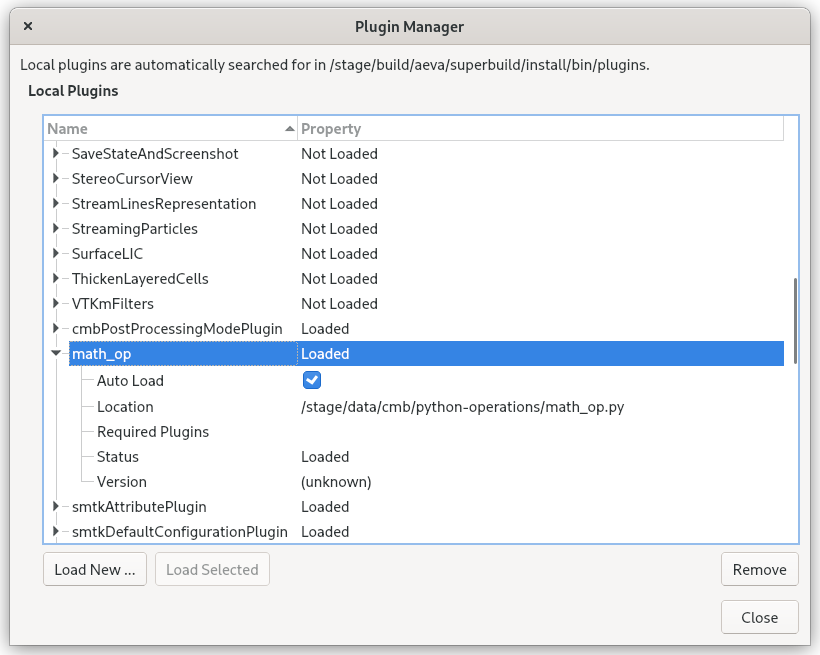
Be sure once it is loaded to click the “Auto Load” checkbox and restart modelbuilder. You should then be able to find the operation in the toolbox:
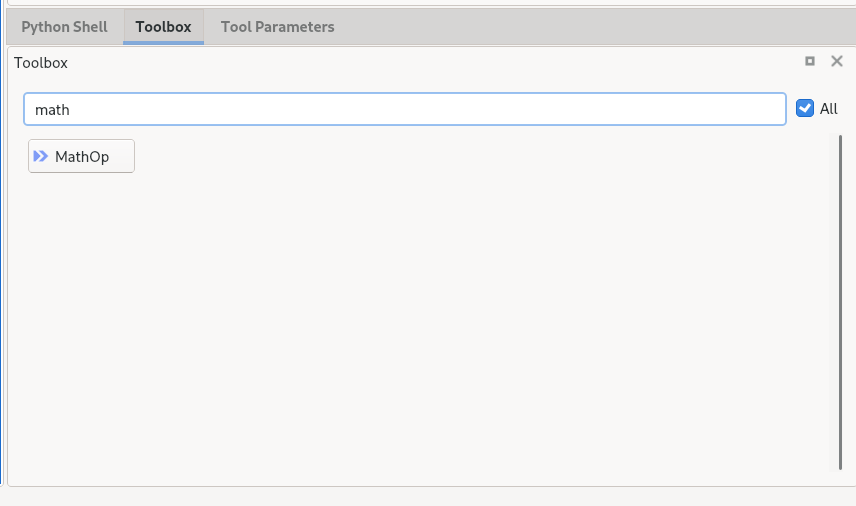
(Note that you’ll have to click the “All” checkbox next to the search bar to find it.)