# Custom Application
**URL:** https://discourse.kitware.com/t/custom-application/1008
**Category:** Computational Model Builder (CMB)
**Created:** [March 22, 2023, 6:46pm UTC](https://discourse.kitware.com/t/custom-application/1008 "2023-03-22T18:46:31Z")
**Posts on this page:** 17
**Page:** 1
### Author:  [@Muhammad\_Saad\_Atique](https://discourse.kitware.com/u/Muhammad_Saad_Atique)
#### Post date: [March 22, 2023, 6:46pm UTC](https://discourse.kitware.com/t/custom-application/1008/1 "2023-03-22T18:46:31Z")
Can we create a custom application/gui using CMB like we can in ParaView?
---
### Author:  [@Bob\_Obara](https://discourse.kitware.com/u/Bob_Obara)
#### Post date: [March 22, 2023, 6:58pm UTC](https://discourse.kitware.com/t/custom-application/1008/2 "2023-03-22T18:58:56Z")
Yes you can. In fact the CMB ModelBuilder application itself is mainly a custom branded ParaView application with a set of plugins.
Both ModelBuilder and the underlying toolkit (SMTK) are under a BSD open source license so they can be used in both open and close source projects.
---
### Author:  [@Muhammad\_Saad\_Atique](https://discourse.kitware.com/u/Muhammad_Saad_Atique)
#### Post date: [March 22, 2023, 7:00pm UTC](https://discourse.kitware.com/t/custom-application/1008/3 "2023-03-22T19:00:39Z")
Is there any documentation or github repo for such examples. I am new to it and want to build a simple gui that leverages certain features from CMB and Paraview
---
### Author:  [@dcthomp](https://discourse.kitware.com/u/dcthomp)
#### Post date: [March 23, 2023, 2:39am UTC](https://discourse.kitware.com/t/custom-application/1008/4 "2023-03-23T02:39:05Z")
SMTK provides ParaView plugins that each expose different functionality within ParaView (extra dock panels, menus, behaviors for loading files, etc.). By choosing which plugins you package with your application, you can choose which functionality your application includes. See [here](https://smtk.readthedocs.io/en/latest/userguide/extension/paraview/index.html) for a description of SMTK’s ParaView plugin architecture.
The [cmb-superbuild](https://gitlab.kitware.com/cmb/cmb-superbuild/) repo is how we build applications, and it is this repository that controls which plugins are distributed with a given application. An example is the cmb-2d application. It includes all of the plugins SMTK provides _except_ for the two listed [here](https://gitlab.kitware.com/cmb/cmb-superbuild/-/blob/master/packages/cmb2d/cmb2d.configure.cmake#L14-16).
---
### Author:  [@johnt](https://discourse.kitware.com/u/johnt)
#### Post date: [March 23, 2023, 1:11pm UTC](https://discourse.kitware.com/t/custom-application/1008/5 "2023-03-23T13:11:03Z")
In addition to standard ParaView plugins, the most common way people customize the application (called “modelbuilder”) is by developing a CMB plugin with additional functionality specific to the solver(s) of interest. What simulation codes are you are working with?
There are a number of working examples in the [CMB Plugins](https://gitlab.kitware.com/cmb/plugins) repository, including the cmb-2d example David pointed to. You can get a general look at how modelbuilder works with that particular plugin at [https://cmb2d.readthedocs.io](https://cmb2d.readthedocs.io).
Thanks for your interest in CMB.
---
### Author:  [@Muhammad\_Saad\_Atique](https://discourse.kitware.com/u/Muhammad_Saad_Atique)
#### Post date: [March 23, 2023, 1:29pm UTC](https://discourse.kitware.com/t/custom-application/1008/6 "2023-03-23T13:29:27Z")
> [@johnt](#):
>
> What simul
I have my own simulation of Mechanical Bodies written in C++, all I want is to create a GUI which takes in file from the user, apply boundary conditions to it, select regions and apply forces to the body, do meshing and then pass this body to my simulation.
---
### Author:  [@johnt](https://discourse.kitware.com/u/johnt)
#### Post date: [March 23, 2023, 3:17pm UTC](https://discourse.kitware.com/t/custom-application/1008/7 "2023-03-23T15:17:14Z")
For the simple case you describe, you can get started without developing a plugin.
1. Are you aware that you can download the CMB modelbuilder application? The public folder is at [this location](https://data.kitware.com/#collection/58fa68228d777f16d01e03e5/folder/5926ead78d777f16d01e16df). I recommend you start by going to the 23.01 release subfolder [here](https://data.kitware.com/#collection/58fa68228d777f16d01e03e5/folder/63dd76b6046e924d0df194b2) and downloading the package for your OS. Unzip that somewhere convenient on your machine and try running the modelbuilder executable that is in bin folder.
2. To assign boundary conditions and forces, you would create an SMTK template file, which is an XML formatted file specifying the various simulation parameters to display in the modelbuilder UI.
- The file format is documented at [https://smtk.readthedocs.io/en/latest/userguide/attribute/file-syntax.html](https://smtk.readthedocs.io/en/latest/userguide/attribute/file-syntax.html)
- One of the simplest working examples is in the cmb-2d project at [https://gitlab.kitware.com/cmb/plugins/cmb-2d/-/blob/master/simulation-workflows/CMB2D.sbt](https://gitlab.kitware.com/cmb/plugins/cmb-2d/-/blob/master/simulation-workflows/CMB2D.sbt) . If you clone that repo, you should be able to open that file in modelbuilder and see how you can edit values in the “Attribute Editor” view.
3. For 3D meshing, we don’t have a standard connection (the cmb-2d connects to a 2D mesher, as the name implies). In the past, we have connected modelbuilder to [Gmsh](https://gmsh.info/) using their docker image. I think I can track down a working example here if you want to try that.
4. The “final” step is to write a Python script to generate the input file(s) that you solver reads. That Python script would use our API to traverse the data entered for your BCs and load conditions. Referring to the cmb-2d code again, the script to generate its input file starts at [https://gitlab.kitware.com/cmb/plugins/cmb-2d/-/blob/master/simulation-workflows/CMB2D.py](https://gitlab.kitware.com/cmb/plugins/cmb-2d/-/blob/master/simulation-workflows/CMB2D.py) (which imports another python script in a subdirectory).
I hope this is enough to get you started,
---
### Author:  [@Muhammad\_Saad\_Atique](https://discourse.kitware.com/u/Muhammad_Saad_Atique)
#### Post date: [March 23, 2023, 3:24pm UTC](https://discourse.kitware.com/t/custom-application/1008/8 "2023-03-23T15:24:00Z")
Thank you so much for a detailed response, appreciate it! One last question, would I be able to link this to my own simulation? As I said I want to use CMB as a preprocessing tool and after doing meshing I want to pass my object (In the form of Matrix) to my own simulation and then display the results of my simulation back to modelBuilder
---
### Author:  [@johnt](https://discourse.kitware.com/u/johnt)
#### Post date: [March 23, 2023, 3:57pm UTC](https://discourse.kitware.com/t/custom-application/1008/9 "2023-03-23T15:57:01Z")
You can definitely integrate solvers into the modelbuilder application.
- In most cases, we run the solver as a separate executable that we launch in a background process from modelbuilder, and transfer data through the file system. I can point you to several examples with different levels of integration. With our recent implementation of wind tunnel simulation ([link](https://cmb-wind-tunnel.readthedocs.io)), you launch OpenFOAM applications by clicking a button we added to modelbuilder (with a plugin).
- It sounds like you might instead be interested in compiling your solver directly into modelbuilder? That is also doable, but would require you to go through the CMB build steps – starting with the cmb-superbuild as David described yesterday.
---
### Author:  [@Muhammad\_Saad\_Atique](https://discourse.kitware.com/u/Muhammad_Saad_Atique)
#### Post date: [March 23, 2023, 4:02pm UTC](https://discourse.kitware.com/t/custom-application/1008/10 "2023-03-23T16:02:38Z")
I think for now I could work with either of the two options.
Thank you so much again. I will go through all these resources and try to see how I can create my application. Thanks again
---
### Author:  [@Muhammad\_Saad\_Atique](https://discourse.kitware.com/u/Muhammad_Saad_Atique)
#### Post date: [March 23, 2023, 4:05pm UTC](https://discourse.kitware.com/t/custom-application/1008/11 "2023-03-23T16:05:43Z")
Just to confirm when you said open the file in modelBuilder you meant to open the .sbt file, right? I am trying to do that but nothing shows up. So just wanted to confirm
---
### Author:  [@johnt](https://discourse.kitware.com/u/johnt)
#### Post date: [March 24, 2023, 12:48am UTC](https://discourse.kitware.com/t/custom-application/1008/12 "2023-03-24T00:48:36Z")
Sorry to hear that. Yes, you should be able to open the .sbt file and see a simple UI in the `Attribute Editor` tab. I am not able to duplicate the problem here. Using linux (Ubuntu 21.04):
- I downloaded and unzipped the `modelbuilder-23.01.-Linux-x86_64.tar.gz` file.
- And I cloned the `cmb-2d` repository
- I started modelbuilder and used the `File -> Open...` menu to open the `simulation-workflows/CMB2D.sbt` file.
Here’s what I get in the `Attribute Editor`
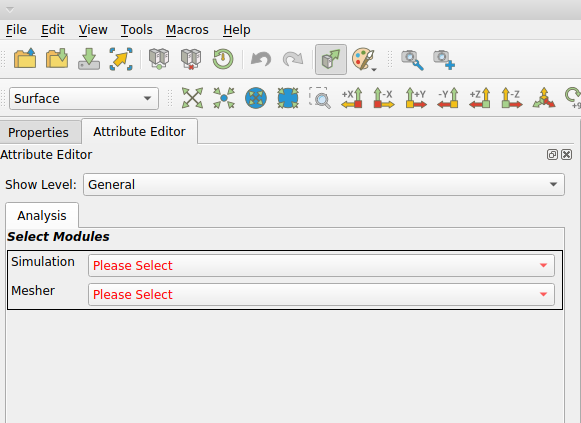
One thing to double-check is that the toggle button to automatically apply changes is set. In the screenshot, that is in the first toolbar row, the 10th icon from the left.
Another thing to try is to check the `Properties` view. I don’t think it is displayed be default, so you might have to go to the `View` menu to display it. Once it’s open, check for the `Apply` button at the top of the view – it should be disabled.
You didn’t mention so, but are there any messages in the `Output Messages` view?
Finally, if you aren’t using linux, let me know what platform you are on and I’ll try that one tomorrow.
---
### Author:  [@Muhammad\_Saad\_Atique](https://discourse.kitware.com/u/Muhammad_Saad_Atique)
#### Post date: [March 24, 2023, 2:21pm UTC](https://discourse.kitware.com/t/custom-application/1008/13 "2023-03-24T14:21:46Z")
Thanks again, it wasn’t updating itself. Once I selected automatically apply changes it worked. Sorry I am new to it.
And I am using MacOS.
Will I be able to create my own executable that has my custom modelBuilder application and the simulation? Do I need to build modelBuilder from the source for this?
---
### Author:  [@Muhammad\_Saad\_Atique](https://discourse.kitware.com/u/Muhammad_Saad_Atique)
#### Post date: [March 24, 2023, 2:34pm UTC](https://discourse.kitware.com/t/custom-application/1008/14 "2023-03-24T14:34:13Z")
By this I mean, the users don’t have to upload my .sbt file instead whenever the run the .exe file and opens my application they would see the modified UI already set for my application
---
### Author:  [@dcthomp](https://discourse.kitware.com/u/dcthomp)
#### Post date: [March 24, 2023, 2:55pm UTC](https://discourse.kitware.com/t/custom-application/1008/15 "2023-03-24T14:55:15Z")
For this you will need to create a plugin. If your plugin
1. contains an operation that creates an attribute resource with your custom SBT file, and
2. uses a Registrar to register the operation with the operation manager and the `smtk::operation::CreatorGroup`, then the _File→New…_ menu will let users create a new template for your simulation automatically.
See [here](https://gitlab.kitware.com/cmb/smtk/-/blob/master/smtk/session/oscillator/Registrar.cxx#L52-57) for an example.
---
### Author:  [@johnt](https://discourse.kitware.com/u/johnt)
#### Post date: [March 24, 2023, 2:58pm UTC](https://discourse.kitware.com/t/custom-application/1008/16 "2023-03-24T14:58:20Z")
Thanks for the update. The automatically-apply option should be set by default – I’ll see if we can fix that in future releases.
And yes, you can create your own executable with custom modelbuilder and your simulation code. And yes, to do that you will need to build modelbuilder from source. It is not always easy, but to give it a try, I would start by building the standard modelbuilder without your customization.
- The ninja build system might be required on macOS, but even if it’s not, I would highly recommend using it.
- Clone the [cmb-superbuild](https://gitlab.kitware.com/cmb/cmb-superbuild) repository which we use to build modelbuilder and its dependencies.
- One of the libraries modelbuilder uses is Qt 5.15. Install that separately on your machine. I don’t use macOS alot, but I am pretty sure there is a homebrew formula for `qt@5`.
- After installing Qt 5.15, run cmake for the cmb-superbuild, and set `USE_SYSTEM_qt5` to `ON` and `Qt5_DIR` to the `Qt5` directory in your Qt install tree. I think the directory is at `/5.15.2//lib/cmake/Qt5`).
- I would use the cmake defaults for the other options, at least until you get a working build.
- The build process can take awhile. Don’t be surprised if it takes more than an hour.
---
### Author:  [@johnt](https://discourse.kitware.com/u/johnt)
#### Post date: [March 24, 2023, 5:29pm UTC](https://discourse.kitware.com/t/custom-application/1008/17 "2023-03-24T17:29:41Z")
> [@Muhammad\_Saad\_Atique](#):
>
> By this I mean, the users don’t have to upload my .sbt file instead whenever the run the .exe file and opens my application they would see the modified UI already set for my application
The most common way we embed application specifics like this uses the CMB “project” feature to manage the underlying resources cohesively. Both the cmb-2d and wind-tunnel examples use projects.
- When the user creates a new project, the attribute editor is automatically loaded with the .sbt contents. The user can then import their model and set the BCs etc.
- A project is opened, closed, and saved as a single integrated entity.