# Is there a way to use the simulator in Vision Pro?
**URL:** https://discourse.kitware.com/t/is-there-a-way-to-use-the-simulator-in-vision-pro/1667
**Category:** Pulse Physiology Engine
**Created:** [February 4, 2026, 7:35pm UTC](https://discourse.kitware.com/t/is-there-a-way-to-use-the-simulator-in-vision-pro/1667 "2026-02-04T19:35:31Z")
**Posts on this page:** 7
**Page:** 1
### Author:  [@FahimU80](https://discourse.kitware.com/u/FahimU80)
#### Post date: [February 4, 2026, 7:35pm UTC](https://discourse.kitware.com/t/is-there-a-way-to-use-the-simulator-in-vision-pro/1667/1 "2026-02-04T19:35:31Z")
Is there a way to run my Xcode project with the engine on a simulator? It currently only runs on an actual Vision Pro which I dont always have access to.
---
### Author:  [@abray](https://discourse.kitware.com/u/abray)
#### Post date: [February 4, 2026, 9:03pm UTC](https://discourse.kitware.com/t/is-there-a-way-to-use-the-simulator-in-vision-pro/1667/2 "2026-02-04T21:03:06Z")
I don’t see why not… but I have never experimented with xcode simulators
You should be able to run the PulseScenarioDriver executable through a simulator…
Unity might also have a vison pro simulator… but I have not played with it
---
### Author:  [@FahimU80](https://discourse.kitware.com/u/FahimU80)
#### Post date: [February 5, 2026, 4:12pm UTC](https://discourse.kitware.com/t/is-there-a-way-to-use-the-simulator-in-vision-pro/1667/3 "2026-02-05T16:12:48Z")
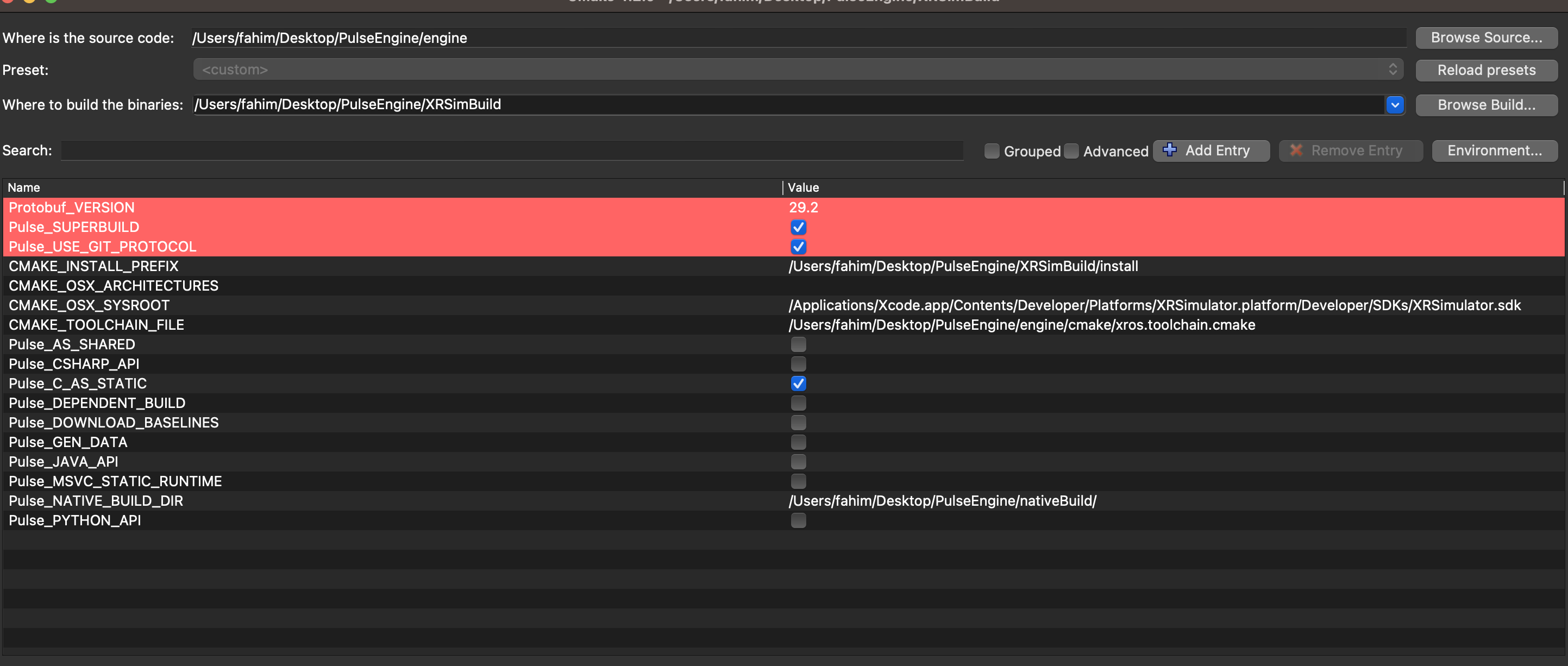
I changed the Sysroot from XROSPlatfrom to XRSimulator and still seem to be getting a build only able to run an actual AVP and not simulator? Also as a note, this is a native project using Apples RealityKit, not Unity.
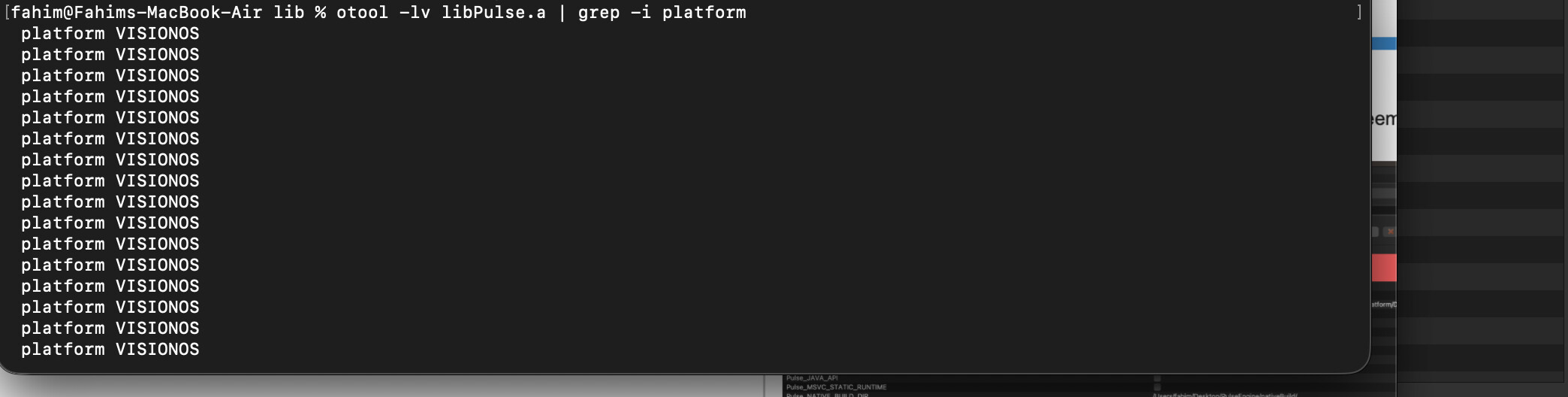
Error: Building for ‘visionOS-simulator’, but linking in object file (/Users/fahim/Desktop/Academy Projects/RealisticALSTraining/RealisticALSTraining/Pulse/Libs/Simulator/libPulse.a2) built for ‘visionOS’
---
### Author:  [@abray](https://discourse.kitware.com/u/abray)
#### Post date: [February 5, 2026, 10:28pm UTC](https://discourse.kitware.com/t/is-there-a-way-to-use-the-simulator-in-vision-pro/1667/4 "2026-02-05T22:28:00Z")
I assume you would build the VisonOS binaries
Then in XCode, switch to a simulator to run those binaries.
Pretty sure this is an XCode thing, not a CMake thing
---
### Author:  [@FahimU80](https://discourse.kitware.com/u/FahimU80)
#### Post date: [February 6, 2026, 1:35pm UTC](https://discourse.kitware.com/t/is-there-a-way-to-use-the-simulator-in-vision-pro/1667/5 "2026-02-06T13:35:41Z")
It was a Cmake toolchain file issue. The current one I believe doesn’t work on simulator but there was an open source toolchain file for visionOS which I used and now its running on the simulator.
---
### Author:  [@abray](https://discourse.kitware.com/u/abray)
#### Post date: [February 6, 2026, 1:50pm UTC](https://discourse.kitware.com/t/is-there-a-way-to-use-the-simulator-in-vision-pro/1667/6 "2026-02-06T13:50:04Z")
Interesting
Can you post a link to that toolchain
---
### Author:  [@FahimU80](https://discourse.kitware.com/u/FahimU80)
#### Post date: [February 6, 2026, 2:00pm UTC](https://discourse.kitware.com/t/is-there-a-way-to-use-the-simulator-in-vision-pro/1667/7 "2026-02-06T14:00:49Z")
Of course!
> **[GitHub - leetal/ios-cmake: A CMake toolchain file for iOS/iPadOS, visionOS,...](https://github.com/leetal/ios-cmake)**
>
> A CMake toolchain file for iOS/iPadOS, visionOS, macOS, watchOS & tvOS C/C++/Obj-C++ development
These were also the set of commands I used:
`# 1. Go to the build folder and clean it
cd ~/Desktop/PulseEngine/XRSimBuild
rm -rf \*
# 2. CRITICAL: Set the Global Platform Variable
# This prevents the sub-builds (like absl) from crashing.
export \_PLATFORM=SIMULATOR\_VISIONOS
# 3. Configure CMake
# Uses the ios-cmake toolchain with the VisionOS Simulator flag
cmake -G “Unix Makefiles”
-DCMAKE\_TOOLCHAIN\_FILE=~/Desktop/ios.toolchain.cmake
-DPLATFORM=SIMULATOR\_VISIONOS
-DDEPLOYMENT\_TARGET=1.0
-DCMAKE\_BUILD\_TYPE=Release
-DCMAKE\_INSTALL\_PREFIX=./install
-DBUILD\_SHARED\_LIBS=OFF
-DBUILD\_TESTING=OFF
-DPulse\_NATIVE\_BUILD\_DIR=../nativeBuild
-DPulse\_C\_AS\_STATIC=ON
-DPulse\_JAVA\_API=OFF
-DPulse\_PYTHON\_API=OFF
../engine
# 4. Compile and Install
And I used `make` to install since its a Unix Makefile which also seems to be necessary because when I generate Xcode I had issues.
`
And then of course as an Xcode thing, you must set the Library search paths accordingly so Xcode knows where to look for the binaries.