# No PyPulse.cp39-win\_amd64.pyd in install/bin
**URL:** https://discourse.kitware.com/t/no-pypulse-cp39-win-amd64-pyd-in-install-bin/1084
**Category:** Pulse Physiology Engine
**Created:** [August 16, 2023, 6:29pm UTC](https://discourse.kitware.com/t/no-pypulse-cp39-win-amd64-pyd-in-install-bin/1084 "2023-08-16T18:29:29Z")
**Posts on this page:** 20
**Page:** 1
### Author:  [@rene\_64](https://discourse.kitware.com/u/rene_64)
#### Post date: [August 16, 2023, 6:29pm UTC](https://discourse.kitware.com/t/no-pypulse-cp39-win-amd64-pyd-in-install-bin/1084/1 "2023-08-16T18:29:29Z")
I am trying to use PyCharm to run the HowTo scripts and am running into the error that the PyPulse module is not being detected. I saw other posts about this and the solution had to do with the PyPulse.cp39-win\_amd64.pyd file. I went into my install/bin and cannot find this file. Did I not complete the build correctly?
---
### Author:  [@abray](https://discourse.kitware.com/u/abray)
#### Post date: [August 16, 2023, 6:39pm UTC](https://discourse.kitware.com/t/no-pypulse-cp39-win-amd64-pyd-in-install-bin/1084/2 "2023-08-16T18:39:25Z")
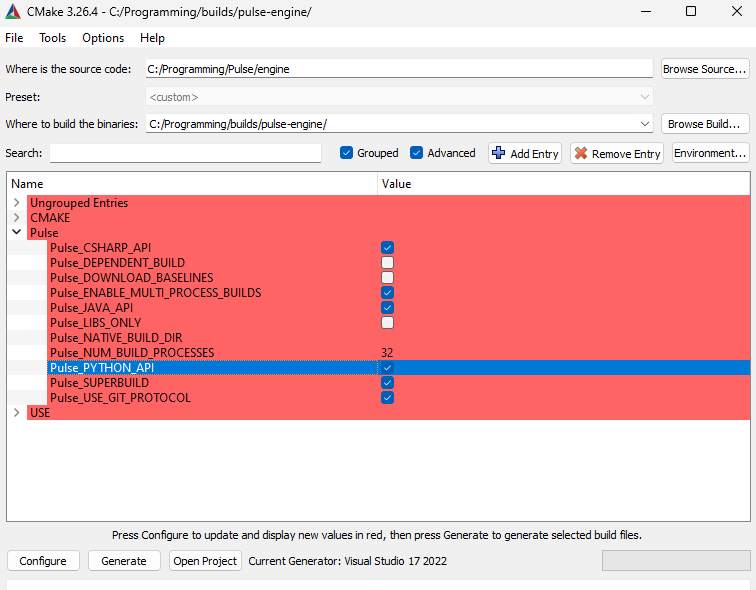
Did you check the Python API support in CMake?
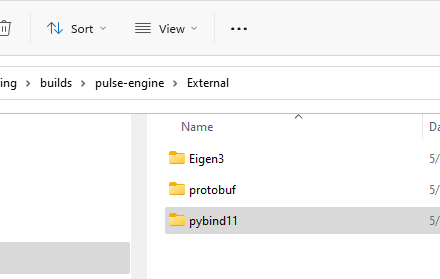
You should have this pybind11 folder in your build tree here
---
### Author:  [@rene\_64](https://discourse.kitware.com/u/rene_64)
#### Post date: [August 16, 2023, 6:40pm UTC](https://discourse.kitware.com/t/no-pypulse-cp39-win-amd64-pyd-in-install-bin/1084/3 "2023-08-16T18:40:51Z")
I did check that box and I do have that folder.
---
### Author:  [@abray](https://discourse.kitware.com/u/abray)
#### Post date: [August 16, 2023, 6:49pm UTC](https://discourse.kitware.com/t/no-pypulse-cp39-win-amd64-pyd-in-install-bin/1084/4 "2023-08-16T18:49:34Z")
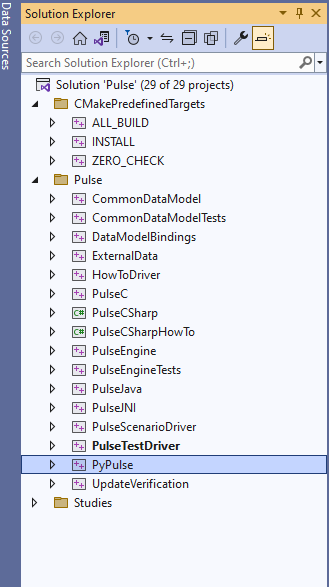
Are you using visual studio?
You should have this PyPulse project in the Innerbuild/Pulse.sln
---
### Author:  [@rene\_64](https://discourse.kitware.com/u/rene_64)
#### Post date: [August 16, 2023, 6:56pm UTC](https://discourse.kitware.com/t/no-pypulse-cp39-win-amd64-pyd-in-install-bin/1084/5 "2023-08-16T18:56:01Z")
I am using PyCharm.
---
### Author:  [@abray](https://discourse.kitware.com/u/abray)
#### Post date: [August 16, 2023, 6:56pm UTC](https://discourse.kitware.com/t/no-pypulse-cp39-win-amd64-pyd-in-install-bin/1084/6 "2023-08-16T18:56:17Z")
How did you build Pulse?
---
### Author:  [@rene\_64](https://discourse.kitware.com/u/rene_64)
#### Post date: [August 16, 2023, 7:02pm UTC](https://discourse.kitware.com/t/no-pypulse-cp39-win-amd64-pyd-in-install-bin/1084/7 "2023-08-16T19:02:02Z")
I followed these instructions:
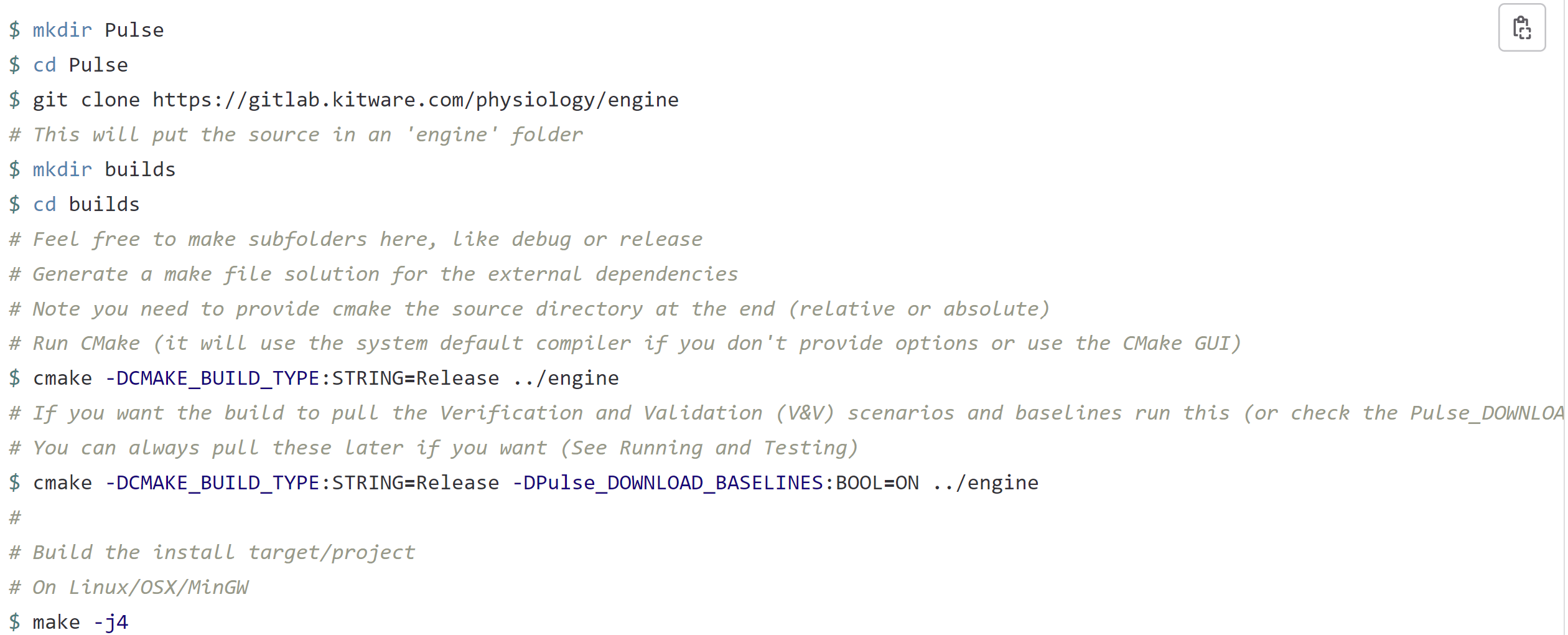
However, I was unable to make the “make -j4” command work. So I went into VSCode and built it from there.
---
### Author:  [@abray](https://discourse.kitware.com/u/abray)
#### Post date: [August 16, 2023, 7:05pm UTC](https://discourse.kitware.com/t/no-pypulse-cp39-win-amd64-pyd-in-install-bin/1084/8 "2023-08-16T19:05:37Z")
Sounds like there was an error in the build
Can you try to find that error?
I assume that the error was with building the PyPulse project
You can try to cd into the `build/Innerbuild` directory
Then do `make PyPulse`
That should try to build PyPulse and you can see if there is an error
---
### Author:  [@rene\_64](https://discourse.kitware.com/u/rene_64)
#### Post date: [August 17, 2023, 3:18pm UTC](https://discourse.kitware.com/t/no-pypulse-cp39-win-amd64-pyd-in-install-bin/1084/9 "2023-08-17T15:18:14Z")
I get this error when I run “make PyPulse”: make: \*\*\* No rule to make target ‘PyPulse’. Stop.
---
### Author:  [@abray](https://discourse.kitware.com/u/abray)
#### Post date: [August 17, 2023, 3:40pm UTC](https://discourse.kitware.com/t/no-pypulse-cp39-win-amd64-pyd-in-install-bin/1084/10 "2023-08-17T15:40:29Z")
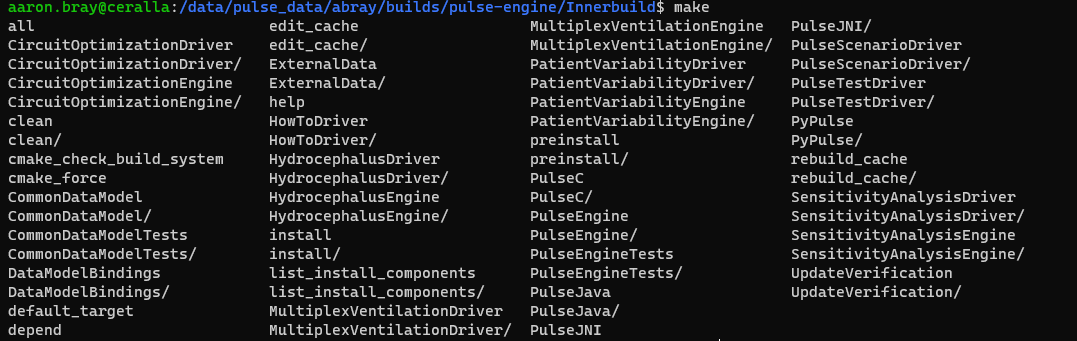
If you enter `make` and hit tab twice (Rather than enter) on the command line, you will get a list of make targets. Mine looks like this:
---
### Author:  [@rene\_64](https://discourse.kitware.com/u/rene_64)
#### Post date: [August 17, 2023, 3:44pm UTC](https://discourse.kitware.com/t/no-pypulse-cp39-win-amd64-pyd-in-install-bin/1084/11 "2023-08-17T15:44:12Z")
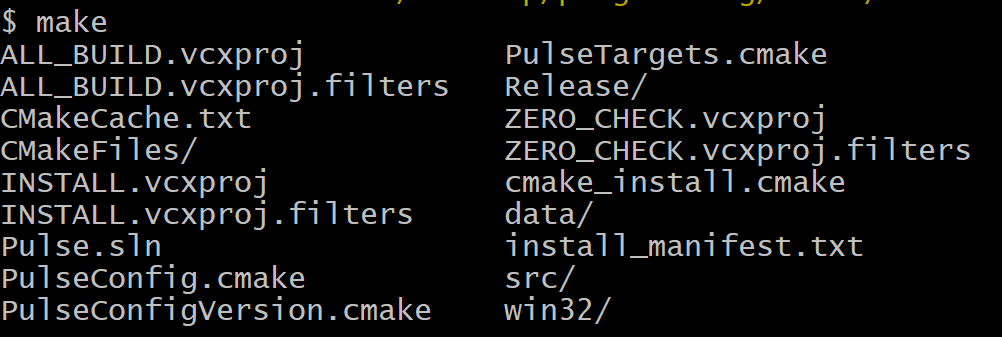
Mine looks like this:
---
### Author:  [@abray](https://discourse.kitware.com/u/abray)
#### Post date: [August 17, 2023, 3:56pm UTC](https://discourse.kitware.com/t/no-pypulse-cp39-win-amd64-pyd-in-install-bin/1084/12 "2023-08-17T15:56:40Z")
Oh, you are on windows using msvc
So open the Pulse.sln and right click and build the PyPulse project
---
### Author:  [@rene\_64](https://discourse.kitware.com/u/rene_64)
#### Post date: [August 17, 2023, 4:06pm UTC](https://discourse.kitware.com/t/no-pypulse-cp39-win-amd64-pyd-in-install-bin/1084/13 "2023-08-17T16:06:28Z")
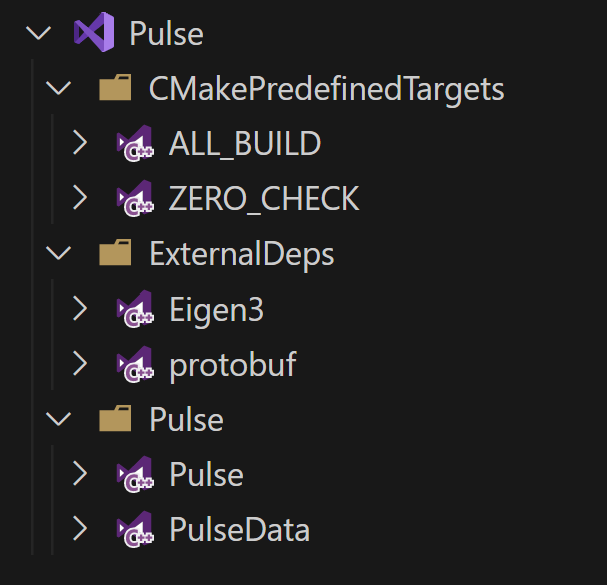
This is what I get when I open the sln file in vscode. If I try to open any of the drop downs to fine PyPulse, the file crashes.
---
### Author:  [@abray](https://discourse.kitware.com/u/abray)
#### Post date: [August 17, 2023, 4:11pm UTC](https://discourse.kitware.com/t/no-pypulse-cp39-win-amd64-pyd-in-install-bin/1084/14 "2023-08-17T16:11:41Z")
That is the Pulse.sln in your build directory.
There should be another Pulse.sln in the Innerbuild directory in your build directory. Can you open that one and look for PyPulse?
---
### Author:  [@rene\_64](https://discourse.kitware.com/u/rene_64)
#### Post date: [August 17, 2023, 4:33pm UTC](https://discourse.kitware.com/t/no-pypulse-cp39-win-amd64-pyd-in-install-bin/1084/15 "2023-08-17T16:33:11Z")
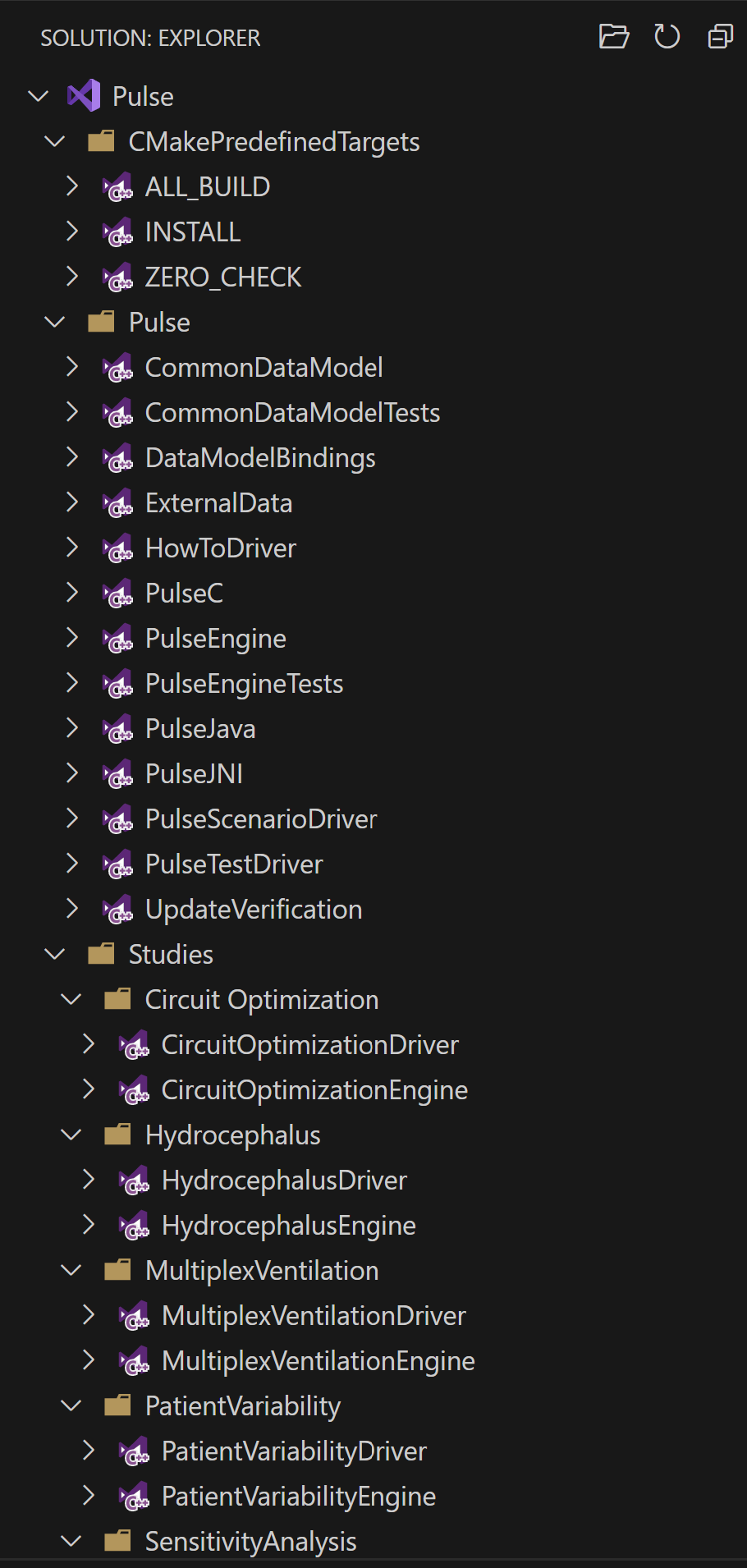
There does not seem to be PyPulse in this sln file either.
---
### Author:  [@abray](https://discourse.kitware.com/u/abray)
#### Post date: [August 17, 2023, 4:58pm UTC](https://discourse.kitware.com/t/no-pypulse-cp39-win-amd64-pyd-in-install-bin/1084/16 "2023-08-17T16:58:41Z")
Since the outer build solution does not have a pybid11 project under external, and the inner build solution does not have PyPulse in it. I don’t believe that the Pulse python option was enabled when you ran (configure and generate) cmake. Maybe cmake could not find python on your system when you configured it…
Can you try executing the build process again? Look for any errors in the cmake gui about python.
When you open the first pulse solution, you should have eigen, protobuf, and pybind11 projects when the python support is enabled in the cmake gui.
---
### Author:  [@rene\_64](https://discourse.kitware.com/u/rene_64)
#### Post date: [August 17, 2023, 5:00pm UTC](https://discourse.kitware.com/t/no-pypulse-cp39-win-amd64-pyd-in-install-bin/1084/17 "2023-08-17T17:00:41Z")
This is the message I get when I configure on CMAKE with the python API box checked:
Using preset install directory C:/Users/14438/Desktop/Programming/builds/pulse-engine/install
Using python: C:/Users/14438/AppData/Local/Programs/Python/Python39/python.exe
Optimizing your superbuild experience
SuperBuild - First pass
Building multiple protobuf configurations at once
SuperBuild - First pass - done
SuperBuild - Pulse =\> Requires Eigen3, protobuf, pybind11,
SuperBuild - Eigen3[OK]
CMake Warning (dev) at C:/Program Files/CMake/share/cmake-3.27/Modules/ExternalProject.cmake:3136 (message):
The DOWNLOAD\_EXTRACT\_TIMESTAMP option was not given and policy CMP0135 is
not set. The policy’s OLD behavior will be used. When using a URL
download, the timestamps of extracted files should preferably be that of
the time of extraction, otherwise code that depends on the extracted
contents might not be rebuilt if the URL changes. The OLD behavior
preserves the timestamps from the archive instead, but this is usually not
what you want. Update your project to the NEW behavior or specify the
DOWNLOAD\_EXTRACT\_TIMESTAMP option with a value of true to avoid this
robustness issue.
Call Stack (most recent call first):
C:/Program Files/CMake/share/cmake-3.27/Modules/ExternalProject.cmake:4345 (\_ep\_add\_download\_command)
cmake/utilities/AddExternalProject.cmake:87 (ExternalProject\_add)
cmake/external/External\_Eigen3.cmake:6 (add\_external\_project\_ex)
cmake/utilities/SolveDependencies.cmake:868 (include)
cmake/utilities/SolveDependencies.cmake:942 (ExternalProject\_Include\_Dependencies)
cmake/external/CMakeLists.txt:86 (ExternalProject\_Include\_Dependencies)
This warning is for project developers. Use -Wno-dev to suppress it.
Eigen3\_DIR : C:/Users/14438/Desktop/Programming/builds/pulse-engine/External/Eigen3/install/share/eigen3/cmake
Building multiple protobuf configurations at once
SuperBuild - protobuf[OK]
CMake Warning (dev) at C:/Program Files/CMake/share/cmake-3.27/Modules/ExternalProject.cmake:3136 (message):
The DOWNLOAD\_EXTRACT\_TIMESTAMP option was not given and policy CMP0135 is
not set. The policy’s OLD behavior will be used. When using a URL
download, the timestamps of extracted files should preferably be that of
the time of extraction, otherwise code that depends on the extracted
contents might not be rebuilt if the URL changes. The OLD behavior
preserves the timestamps from the archive instead, but this is usually not
what you want. Update your project to the NEW behavior or specify the
DOWNLOAD\_EXTRACT\_TIMESTAMP option with a value of true to avoid this
robustness issue.
Call Stack (most recent call first):
C:/Program Files/CMake/share/cmake-3.27/Modules/ExternalProject.cmake:4345 (\_ep\_add\_download\_command)
cmake/utilities/AddExternalProject.cmake:87 (ExternalProject\_add)
cmake/external/External\_protobuf.cmake:46 (add\_external\_project\_ex)
cmake/utilities/SolveDependencies.cmake:868 (include)
cmake/utilities/SolveDependencies.cmake:942 (ExternalProject\_Include\_Dependencies)
cmake/external/CMakeLists.txt:86 (ExternalProject\_Include\_Dependencies)
This warning is for project developers. Use -Wno-dev to suppress it.
protobuf\_DIR : C:/Users/14438/Desktop/Programming/builds/pulse-engine/External/protobuf/install/cmake
SuperBuild - pybind11[OK]
CMake Warning (dev) at C:/Program Files/CMake/share/cmake-3.27/Modules/ExternalProject.cmake:3136 (message):
The DOWNLOAD\_EXTRACT\_TIMESTAMP option was not given and policy CMP0135 is
not set. The policy’s OLD behavior will be used. When using a URL
download, the timestamps of extracted files should preferably be that of
the time of extraction, otherwise code that depends on the extracted
contents might not be rebuilt if the URL changes. The OLD behavior
preserves the timestamps from the archive instead, but this is usually not
what you want. Update your project to the NEW behavior or specify the
DOWNLOAD\_EXTRACT\_TIMESTAMP option with a value of true to avoid this
robustness issue.
Call Stack (most recent call first):
C:/Program Files/CMake/share/cmake-3.27/Modules/ExternalProject.cmake:4345 (\_ep\_add\_download\_command)
cmake/utilities/AddExternalProject.cmake:87 (ExternalProject\_add)
cmake/external/External\_pybind11.cmake:7 (add\_external\_project\_ex)
cmake/utilities/SolveDependencies.cmake:868 (include)
cmake/utilities/SolveDependencies.cmake:942 (ExternalProject\_Include\_Dependencies)
cmake/external/CMakeLists.txt:86 (ExternalProject\_Include\_Dependencies)
This warning is for project developers. Use -Wno-dev to suppress it.
pybind11\_DIR : C:/Users/14438/Desktop/Programming/builds/pulse-engine/External/pybind11/install/share/cmake/pybind11
SuperBuild - Pulse[OK]
Pulling the latest Pulse Baselines!
Configuring done (1.0s)
---
### Author:  [@abray](https://discourse.kitware.com/u/abray)
#### Post date: [August 17, 2023, 5:23pm UTC](https://discourse.kitware.com/t/no-pypulse-cp39-win-amd64-pyd-in-install-bin/1084/18 "2023-08-17T17:23:58Z")
OK, give that a build
---
### Author:  [@rene\_64](https://discourse.kitware.com/u/rene_64)
#### Post date: [August 17, 2023, 6:34pm UTC](https://discourse.kitware.com/t/no-pypulse-cp39-win-amd64-pyd-in-install-bin/1084/19 "2023-08-17T18:34:48Z")
When I hit generate and then open project, it simply opens the sln file in plain text. How do I go about completing the build?
---
### Author:  [@abray](https://discourse.kitware.com/u/abray)
#### Post date: [August 17, 2023, 6:35pm UTC](https://discourse.kitware.com/t/no-pypulse-cp39-win-amd64-pyd-in-install-bin/1084/20 "2023-08-17T18:35:56Z")
Open the sln file with visual studio
[Next page](https://discourse.kitware.com/t/no-pypulse-cp39-win-amd64-pyd-in-install-bin/1084.md?page=2)