### Author:  [@dhuang101](https://discourse.kitware.com/u/dhuang101)
#### Post date: [July 20, 2023, 4:55am UTC](https://discourse.kitware.com/t/problems-opening-unity-project-on-macos/1065/1 "2023-07-20T04:55:28Z")
Hello,
So I have a Unity project that builds and runs great on Windows and I was trying to import it and build it for macOS but I am having issues opening Pulse on my Macbook Pro.
When I try to open my project it gives me the errors that Pulse and other related packages don’t exist in the namespace indicating that it is not compiling correctly. I have also tried pulling the original “unity” repository from GitLab and that project will not open in Unity at all with an error saying that the project is not valid.
Any advice would be appreciated thanks!
---
### Author:  [@abray](https://discourse.kitware.com/u/abray)
#### Post date: [July 20, 2023, 12:49pm UTC](https://discourse.kitware.com/t/problems-opening-unity-project-on-macos/1065/2 "2023-07-20T12:49:00Z")
Since Pulse is C++, we have to provide native builds for every os/platform we support.
Does your Macbook Pro have one of them new fangled ARM based processors or a an intel?
As I do not have an ARM based mac, you might need to build the Pulse library for it to work on that particular platform combination. If it is Intel, I can help get you the right build.
---
### Author:  [@dhuang101](https://discourse.kitware.com/u/dhuang101)
#### Post date: [July 20, 2023, 2:05pm UTC](https://discourse.kitware.com/t/problems-opening-unity-project-on-macos/1065/3 "2023-07-20T14:05:32Z")
My Macbook is one of the Intel ones but I would like to be able to build it for both platforms if possible.
Does this just mean that the plugins in the repository need to be rebuilt for Pulse to work on OSX?
Or is there more to it?
---
### Author:  [@abray](https://discourse.kitware.com/u/abray)
#### Post date: [July 20, 2023, 2:33pm UTC](https://discourse.kitware.com/t/problems-opening-unity-project-on-macos/1065/4 "2023-07-20T14:33:18Z")
For runtime problems, that is what I would look at first, that the native dylib is of the proper build.
The asset store version should be the right build for intel macOS though…
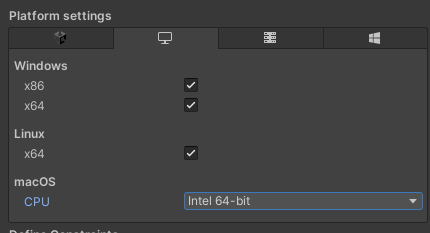
So if you are getting an error opening the project in unity (not opening the built executable, since you cannot build an executable), that seems to be the mac unity not utilizing/seeing/reading the .NET Pulse dll provided in the managed folder of the Pulse asset. I don’t have Unity installed on my mac, but I have seen it open on MacOS Unity instances before… maybe you need to add the macos platform tag the PulseCSharp.dll on your project
---
### Author:  [@dhuang101](https://discourse.kitware.com/u/dhuang101)
#### Post date: [July 24, 2023, 12:20am UTC](https://discourse.kitware.com/t/problems-opening-unity-project-on-macos/1065/5 "2023-07-24T00:20:20Z")
I had a look at the settings you suggested and my PulseCSharp.dll does not have platform settings for Linux or macOS.
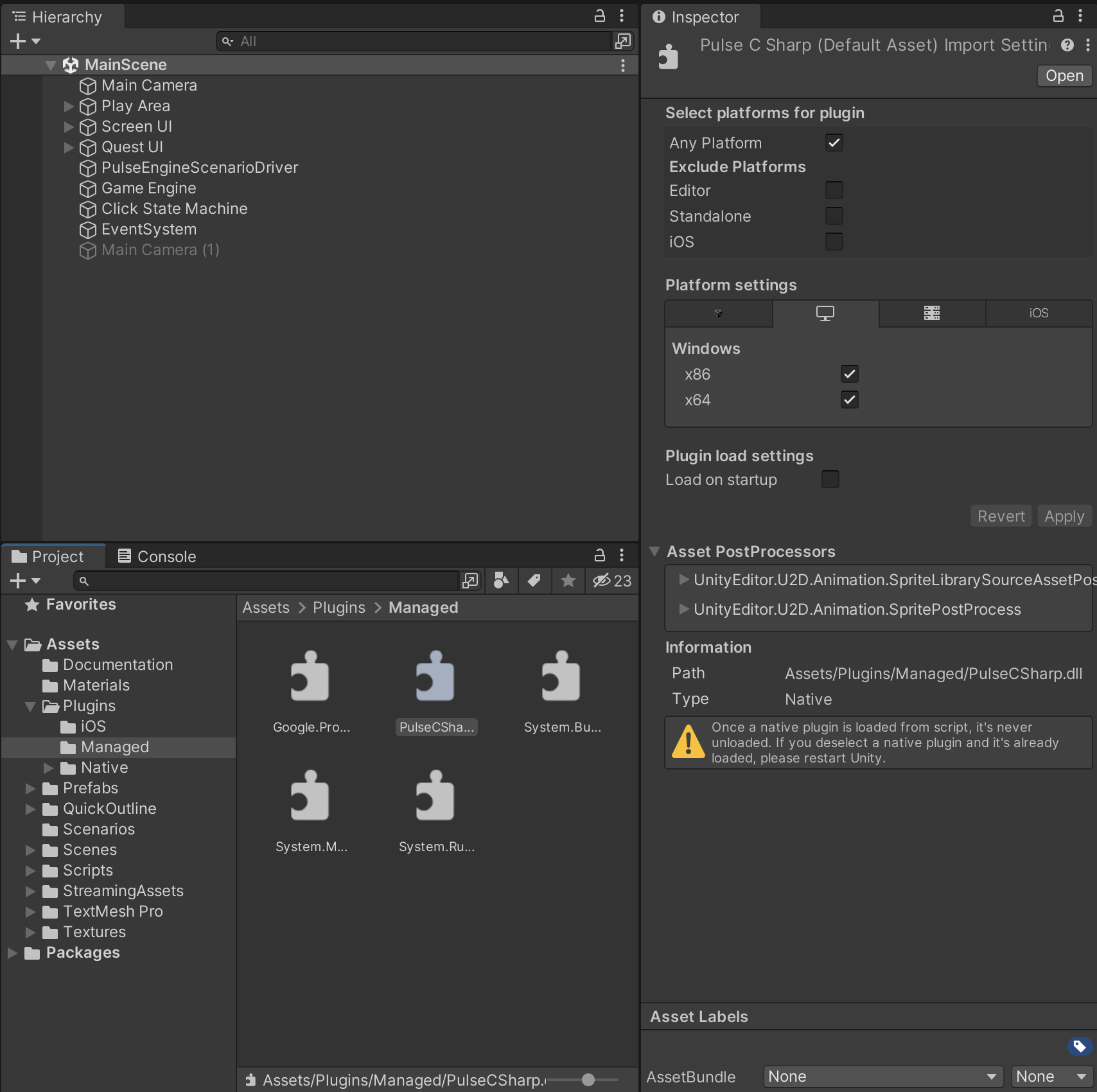
Also, it doesn’t even let me open the original Unity project from GitLab so I wasn’t able to try with that either.

---
### Author:  [@abray](https://discourse.kitware.com/u/abray)
#### Post date: [July 24, 2023, 1:34pm UTC](https://discourse.kitware.com/t/problems-opening-unity-project-on-macos/1065/6 "2023-07-24T13:34:29Z")
Have you tried installing mono?
>
---
### Author:  [@dhuang101](https://discourse.kitware.com/u/dhuang101)
#### Post date: [July 24, 2023, 2:14pm UTC](https://discourse.kitware.com/t/problems-opening-unity-project-on-macos/1065/7 "2023-07-24T14:14:56Z")
I doubled check the .net core sdk and mono installs and also tried using both vscode and regular vs.
Still the same errors though. Can’t think of any leads on why it isn’t able to compile/open either.
---
### Author:  [@abray](https://discourse.kitware.com/u/abray)
#### Post date: [July 24, 2023, 2:26pm UTC](https://discourse.kitware.com/t/problems-opening-unity-project-on-macos/1065/8 "2023-07-24T14:26:52Z")
What kind of player settings are you using?

---
### Author:  [@dhuang101](https://discourse.kitware.com/u/dhuang101)
#### Post date: [July 24, 2023, 2:51pm UTC](https://discourse.kitware.com/t/problems-opening-unity-project-on-macos/1065/9 "2023-07-24T14:51:12Z")
This is what I have got at the moment.

---
### Author:  [@abray](https://discourse.kitware.com/u/abray)
#### Post date: [July 24, 2023, 3:00pm UTC](https://discourse.kitware.com/t/problems-opening-unity-project-on-macos/1065/10 "2023-07-24T15:00:50Z")
Are you able to change the backend to il2cpp?
> **[Unity - Manual: Building plug-ins for desktop platforms](https://docs.unity3d.com/Manual/PluginsForDesktop.html)**
---
### Author:  [@dhuang101](https://discourse.kitware.com/u/dhuang101)
#### Post date: [July 24, 2023, 3:11pm UTC](https://discourse.kitware.com/t/problems-opening-unity-project-on-macos/1065/11 "2023-07-24T15:11:35Z")
Yep, It changes and recompiles with the same errors. I checked the PulseCSharp file in Plugins/Managed and it still does not have platform settings for macOS
---
### Author:  [@abray](https://discourse.kitware.com/u/abray)
#### Post date: [July 24, 2023, 3:31pm UTC](https://discourse.kitware.com/t/problems-opening-unity-project-on-macos/1065/12 "2023-07-24T15:31:27Z")
Maybe try making a copy of that dll and putting it in your application tree
Maybe unity will provide you with different options if it has to create a new meta file
---
### Author:  [@dhuang101](https://discourse.kitware.com/u/dhuang101)
#### Post date: [July 24, 2023, 3:46pm UTC](https://discourse.kitware.com/t/problems-opening-unity-project-on-macos/1065/13 "2023-07-24T15:46:02Z")
No luck with that either. Tried with all combinations of il2cpp/mono and framework types.
Might be some configuration broken with this Mac that I need to investigate.
---
### Author:  [@dhuang101](https://discourse.kitware.com/u/dhuang101)
#### Post date: [July 27, 2023, 4:34am UTC](https://discourse.kitware.com/t/problems-opening-unity-project-on-macos/1065/14 "2023-07-27T04:34:46Z")
I tried on a different Macbook and it seems to open with the same issue.
VSCode’s Omnisharp also indicates that Pulse and it’s corresponding packages are missing in the project.
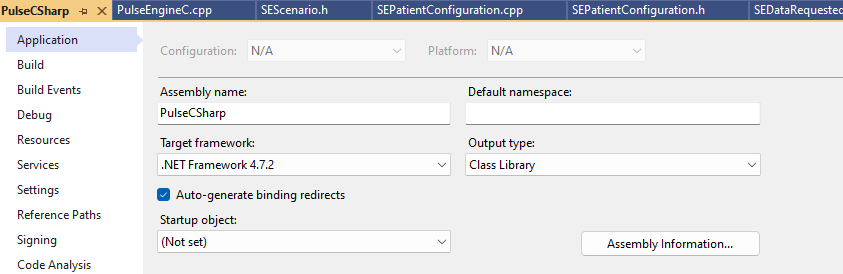
In the .csproj files which TargetFrameworkVersion is being used?
---
### Author:  [@abray](https://discourse.kitware.com/u/abray)
#### Post date: [July 27, 2023, 1:09pm UTC](https://discourse.kitware.com/t/problems-opening-unity-project-on-macos/1065/15 "2023-07-27T13:09:32Z")
What does the managed Google.Protobuf.dll look like in Unity for you?
---
### Author:  [@dhuang101](https://discourse.kitware.com/u/dhuang101)
#### Post date: [July 27, 2023, 1:39pm UTC](https://discourse.kitware.com/t/problems-opening-unity-project-on-macos/1065/16 "2023-07-27T13:39:52Z")
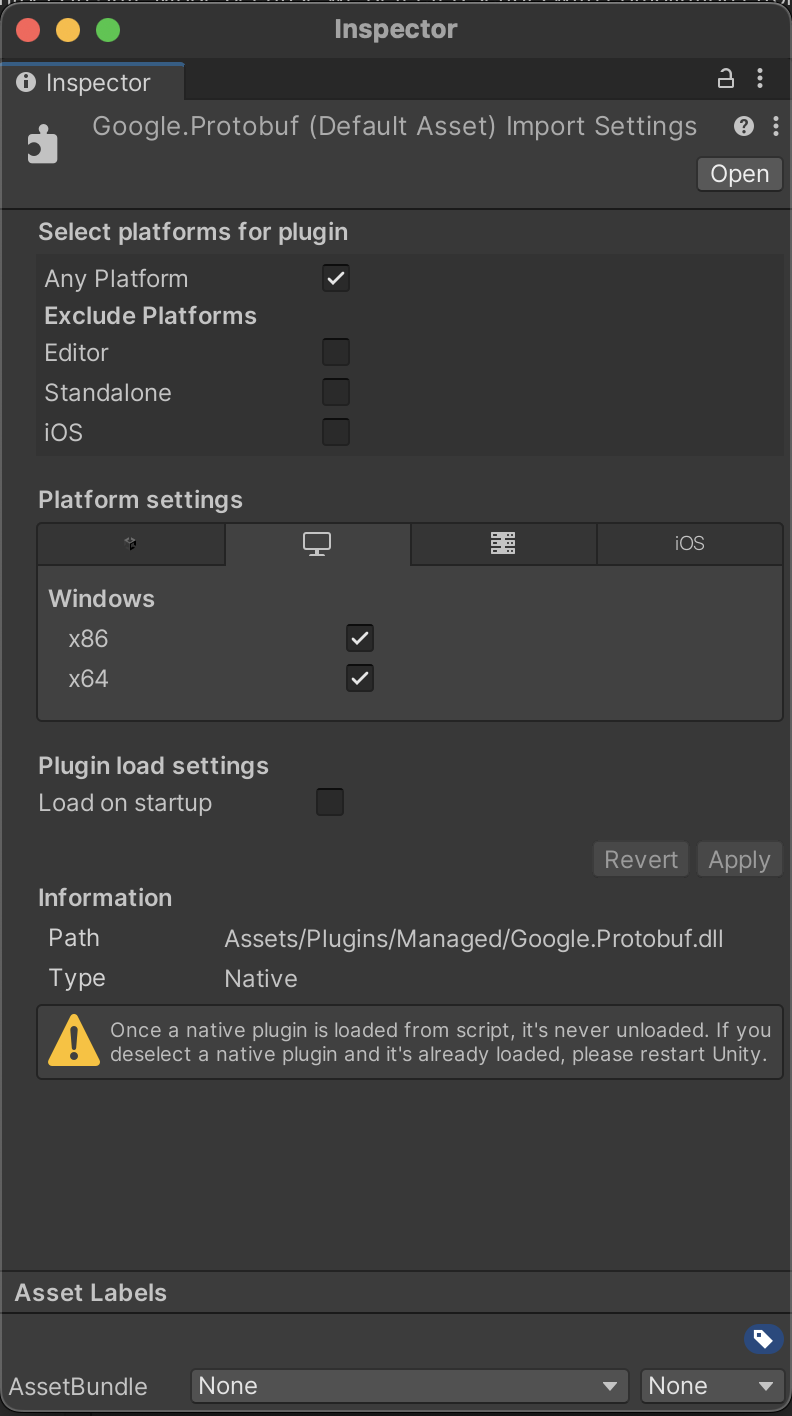
This is what the inspector shows for the Google.Protobuf.dll in the Managed directory.
Similar to the PulseCSharp.dll it does not have macOS platform settings and has a Native type instead of Managed.
---
### Author:  [@abray](https://discourse.kitware.com/u/abray)
#### Post date: [July 27, 2023, 1:44pm UTC](https://discourse.kitware.com/t/problems-opening-unity-project-on-macos/1065/17 "2023-07-27T13:44:02Z")
Here are various protobuf .net dlls of various frameworks… maybe one will be recognized by unity
[https://data.kitware.com/api/v1/item/64c27491b4d956782eee8f8b/download](https://data.kitware.com/api/v1/item/64c27491b4d956782eee8f8b/download)
---
### Author:  [@dhuang101](https://discourse.kitware.com/u/dhuang101)
#### Post date: [July 27, 2023, 2:20pm UTC](https://discourse.kitware.com/t/problems-opening-unity-project-on-macos/1065/18 "2023-07-27T14:20:19Z")
All of the replacement Google.Protobuf have the missing macOS platform settings and now show as Managed targeting .net 4.x.
The PulseCSharp still does not compile though with any of them.
Is there a certain Protobuf file that I should use in combination with a certain Player settings compiler selection?
Or it might just be my Managed dlls are corrupted?
---
### Author:  [@abray](https://discourse.kitware.com/u/abray)
#### Post date: [July 27, 2023, 2:25pm UTC](https://discourse.kitware.com/t/problems-opening-unity-project-on-macos/1065/19 "2023-07-27T14:25:44Z")
They work fine for me on windows
I would try building a simple managed dll with msvc and see how unity interprets it
It seems that mac unity won’t recognize managed dlls from visual studio, so I would try to make one that it can… if I could, and if it does, go from there
---
### Author:  [@abray](https://discourse.kitware.com/u/abray)
#### Post date: [July 27, 2023, 2:34pm UTC](https://discourse.kitware.com/t/problems-opening-unity-project-on-macos/1065/20 "2023-07-27T14:34:35Z")
what version of unity are you using?
[Next page](https://discourse.kitware.com/t/problems-opening-unity-project-on-macos/1065.md?page=2)