# Pulse API Setup in Pycharm
**URL:** https://discourse.kitware.com/t/pulse-api-setup-in-pycharm/1067
**Category:** Pulse Physiology Engine
**Created:** [July 20, 2023, 7:04pm UTC](https://discourse.kitware.com/t/pulse-api-setup-in-pycharm/1067 "2023-07-20T19:04:20Z")
**Posts on this page:** 3
**Page:** 1
### Author:  [@robert.bixler](https://discourse.kitware.com/u/robert.bixler)
#### Post date: [July 20, 2023, 7:04pm UTC](https://discourse.kitware.com/t/pulse-api-setup-in-pycharm/1067/1 "2023-07-20T19:04:20Z")
Hello, I’m having the same issue that is described in this thread:
> [@Python API and PyCharm](https://discourse.kitware.com/t/python-api-and-pycharm/854):
>
> Trying to setup PyCharm on a Window10 PC. I followed the steps from your wiki, inclusing setting for PYTHONPATH PYTHONPATH=C:\Programming\Pulse\engine\src\python;C:\Programming\builds\pulse-engine\Innerbuild\src\python but I am getting the error below C:\Programming\PythonEnv\python.exe C:/Programming/Pulse/engine/src/python/pulse/howto/HowTo\_EngineUse.py Traceback (most recent call last): File “C:\Programming\Pulse\engine\src\python\pulse\howto\HowTo\_EngineUse.py”, line 12, in from puls…
Are there any suggestions for things to try to figure out why the pypulse module is unable to be found?
---
### Author:  [@abray](https://discourse.kitware.com/u/abray)
#### Post date: [July 21, 2023, 3:41am UTC](https://discourse.kitware.com/t/pulse-api-setup-in-pycharm/1067/2 "2023-07-21T03:41:39Z")
You should have a PyPulse\* file in your install/bin
Make the version in the name is the same as the version of python you are using in PyCharm
For example `PyPulse.cpython-38-x86_64-linux-gnu.so` on linux was built with python 3.8
and `PyPulse.cp311-win_amd64.pyd` on windows was build with python 3.11
I open the Pulse/src/python directory as my project in PyCharm
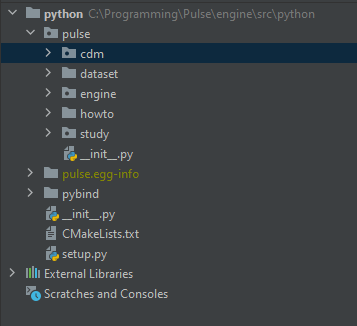
Then you need to manually add these directories to your interpreter in PyCharm
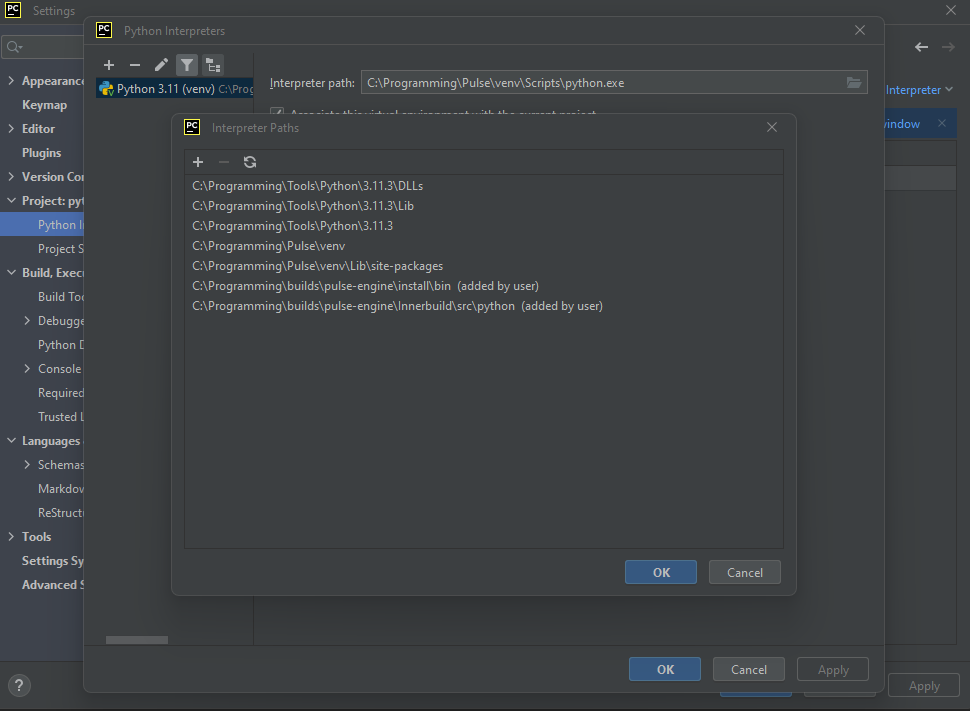
---
### Author:  [@robert.bixler](https://discourse.kitware.com/u/robert.bixler)
#### Post date: [July 21, 2023, 5:35am UTC](https://discourse.kitware.com/t/pulse-api-setup-in-pycharm/1067/3 "2023-07-21T05:35:10Z")
Thanks, switched to Python 11 and it worked. Checking the pypulse version was what helped. I tried both Python 9 and 10 from PyCharm because those were the only ones it detected, so pypulse must have built with a Python 11 that PyCharm wasn’t seeing.