member:(null)
PulseUnityEngine.BaseAllocate (System.Int32 model, System.String data_dir) (at Assets/Plugins/PulsePhysiologyEngine/unity/Scripts/PulseUnityEngine.cs:56)
Pulse.PulseEngineBase..ctor (Pulse.eModelType m, System.String data_dir) (at <1637df1cd6b9405aa5c4f15c07c179ee>:0)
PulseUnityEngine..ctor (Pulse.eModelType m, System.String data_dir) (at Assets/Plugins/PulsePhysiologyEngine/unity/Scripts/PulseUnityEngine.cs:24)
PulseEngineContainer.Setup (System.String state, System.Int32 sampleEveryNthFrame, System.Action onSetupDone, Pulse.CDM.eSerializationFormat format) (at
```
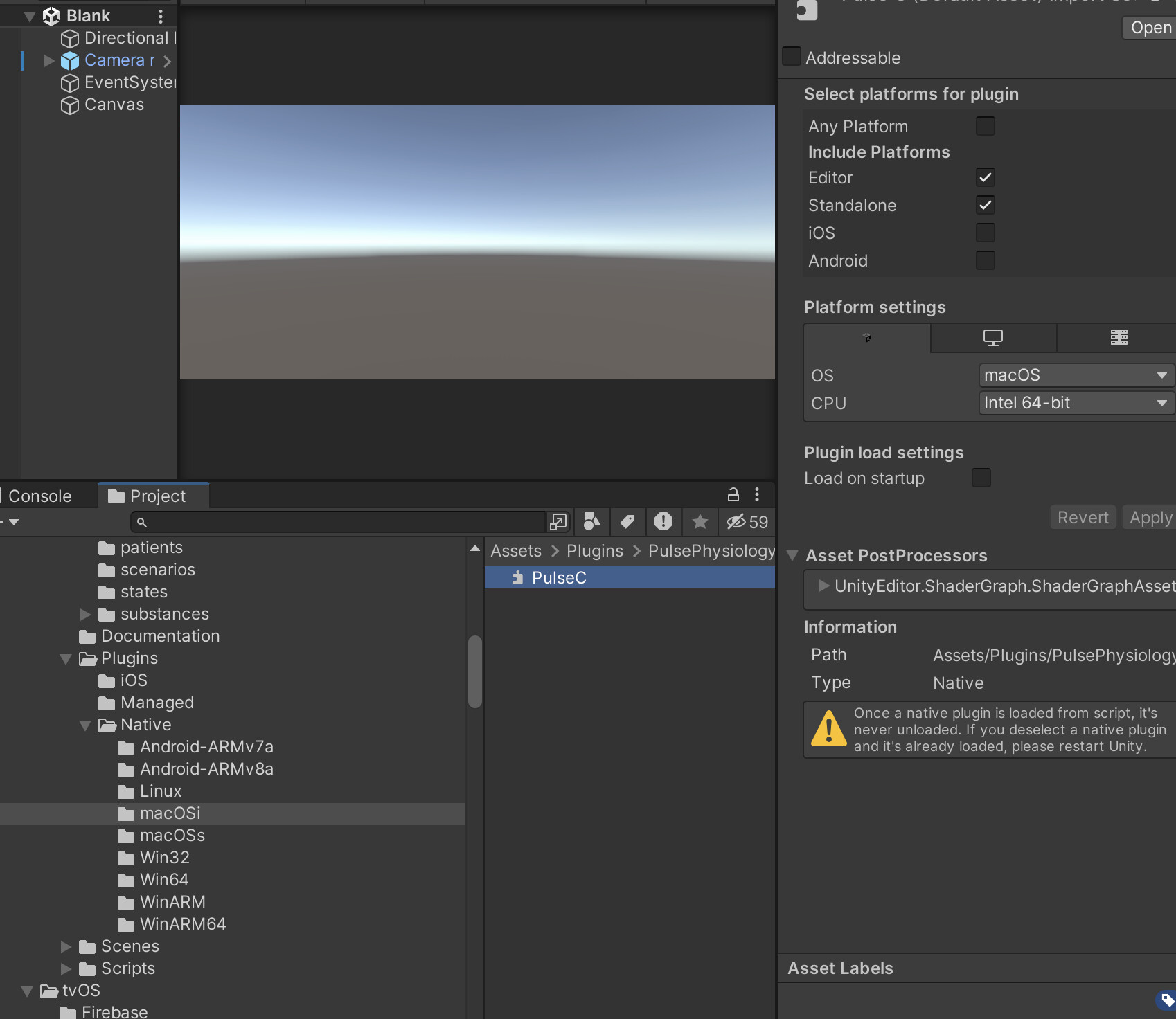
I’m on a intel based macbook. This is how the PulseC.dylib looks like. Any clue what I’m doing wrong?
---
### Author:  [@abray](https://discourse.kitware.com/u/abray)
#### Post date: [September 26, 2023, 7:15pm UTC](https://discourse.kitware.com/t/pulse-engine-in-editor-on-macos-intel/1137/2 "2023-09-26T19:15:25Z")
Are you able to run the VitalsMonitor scene in our Pulse Asset?
---
### Author:  [@Timbo](https://discourse.kitware.com/u/Timbo)
#### Post date: [September 26, 2023, 7:25pm UTC](https://discourse.kitware.com/t/pulse-engine-in-editor-on-macos-intel/1137/3 "2023-09-26T19:25:06Z")
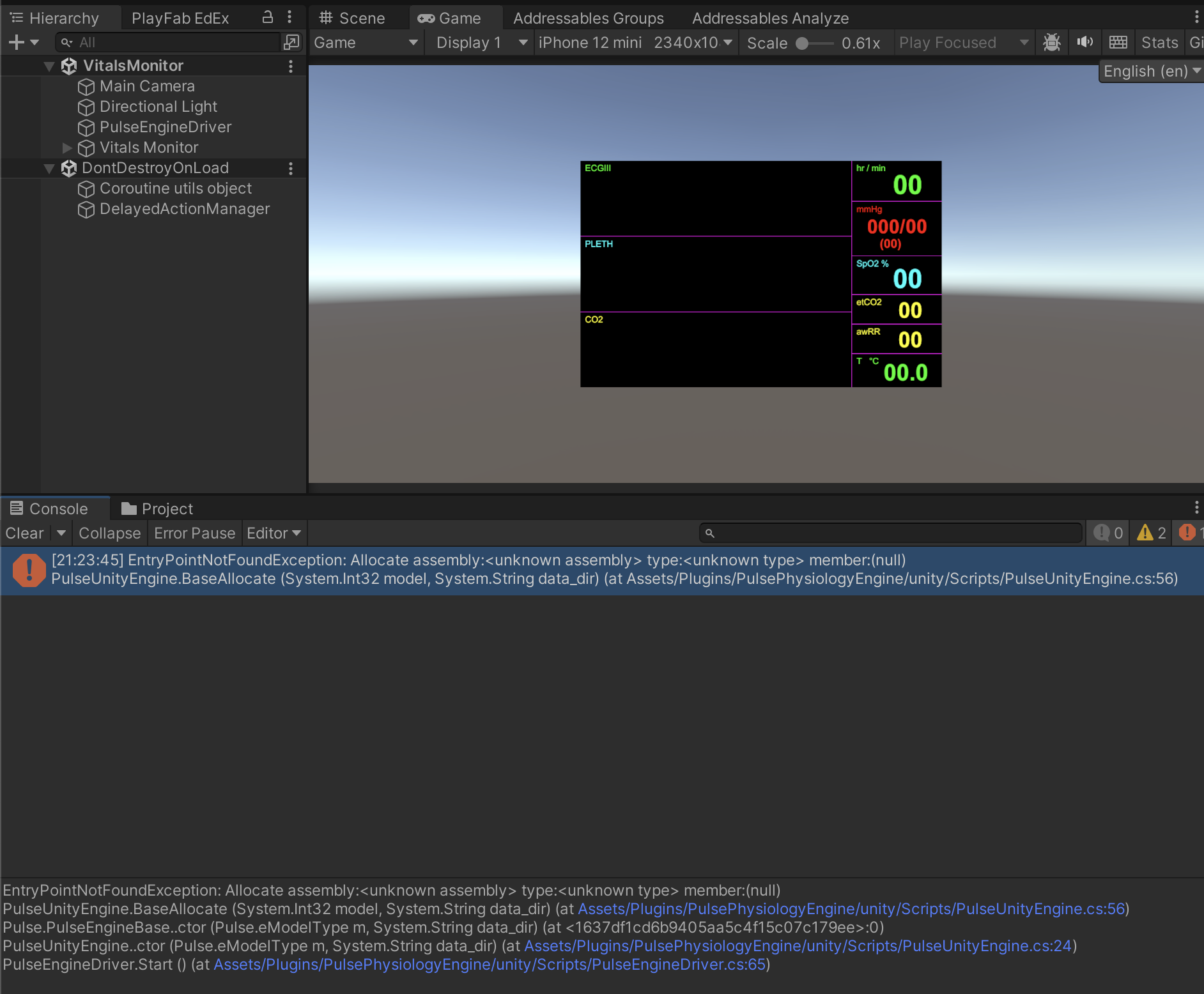
Nope, same error when running the scene. It’s in Unity 2022.3.10f
---
### Author:  [@abray](https://discourse.kitware.com/u/abray)
#### Post date: [September 26, 2023, 7:27pm UTC](https://discourse.kitware.com/t/pulse-engine-in-editor-on-macos-intel/1137/4 "2023-09-26T19:27:29Z")
Are you building IL2CPP?
Do you have a [link.xml](https://gitlab.kitware.com/physiology/unity#il2cpp-build-support) in the root of your project?
---
### Author:  [@Timbo](https://discourse.kitware.com/u/Timbo)
#### Post date: [September 26, 2023, 7:29pm UTC](https://discourse.kitware.com/t/pulse-engine-in-editor-on-macos-intel/1137/5 "2023-09-26T19:29:24Z")
Both yes. I have IL2CPP backend and the link.xml file is in the root indeed.
---
### Author:  [@abray](https://discourse.kitware.com/u/abray)
#### Post date: [September 26, 2023, 7:32pm UTC](https://discourse.kitware.com/t/pulse-engine-in-editor-on-macos-intel/1137/6 "2023-09-26T19:32:26Z")
It seems like the Managed/PulseCSharp.dll is not getting loaded by your system
I am not sure if I need to somehow build that with a different .NET configuration or maybe you need to switch up a .NET setting on your side? Like lowering the version or something?
---
### Author:  [@Timbo](https://discourse.kitware.com/u/Timbo)
#### Post date: [September 26, 2023, 7:34pm UTC](https://discourse.kitware.com/t/pulse-engine-in-editor-on-macos-intel/1137/7 "2023-09-26T19:34:05Z")
Do you mean this .NET setting ?

---
### Author:  [@abray](https://discourse.kitware.com/u/abray)
#### Post date: [September 26, 2023, 7:43pm UTC](https://discourse.kitware.com/t/pulse-engine-in-editor-on-macos-intel/1137/8 "2023-09-26T19:43:14Z")
I have a intel based mac (but I am typing this on my windows box)
I am running in a 2021.3 3D application
My Build Settings are set to macOS and Intel 64-bit + Apple Silicon
My scripting backend is Mono
Api Compatibility Level is .NET Standard 2.1
I switched to IL2CPP and that worked as well
**My PulseCSharp.dll is set to**
Auto Reference On
Validate References On
Any Platform On
The rest are off
**Editor Settings**
Any OS
Any CPU
**Windows, Mac, Linux Settings**
All are checked
The Information lists Assembly Info Targets .NET 4.x
---
### Author:  [@abray](https://discourse.kitware.com/u/abray)
#### Post date: [September 26, 2023, 8:05pm UTC](https://discourse.kitware.com/t/pulse-engine-in-editor-on-macos-intel/1137/9 "2023-09-26T20:05:23Z")
> [@Timbo](#):
>
> `PulseUnityEngine.cs:56`
So that line is looking for the Allocate definition in the PulseC.dylib, and it’s saying that PulseC.dylib is an unknown assembly for some reason…
Have you tried to check the Load on Startup and restart Unity?
I am not sure why it won’t recognize the assemble of that dylib
So maybe this is ignorance on my part in working with macOS
I am building this dylib on a 2015 mac book pro (Retina, 15-inch) running macOS Monterey Version 12.6.9
Are you using a newer or older macOS?
Would that have a major impact on binary compatibility between macOS versions?
---
### Author:  [@abray](https://discourse.kitware.com/u/abray)
#### Post date: [September 26, 2023, 8:08pm UTC](https://discourse.kitware.com/t/pulse-engine-in-editor-on-macos-intel/1137/10 "2023-09-26T20:08:46Z")
Maybe this information would help?
>
I wonder if I have to sign the dylib…ugh
>
---
### Author:  [@Timbo](https://discourse.kitware.com/u/Timbo)
#### Post date: [September 26, 2023, 8:26pm UTC](https://discourse.kitware.com/t/pulse-engine-in-editor-on-macos-intel/1137/11 "2023-09-26T20:26:38Z")
Well, I was triggered by your comment :
```auto
My Build Settings are set to macOS and Intel 64-bit + Apple Silicon
```
I was on the iOS build settings. Switching back to the the MacOS build settings works.
Do you have any clue if it can work when you are in the ‘iOS’ build settings in the editor? Thanks for the help so far, really appreciated.
---
### Author:  [@abray](https://discourse.kitware.com/u/abray)
#### Post date: [September 26, 2023, 8:49pm UTC](https://discourse.kitware.com/t/pulse-engine-in-editor-on-macos-intel/1137/12 "2023-09-26T20:49:47Z")
I am not sure
Maybe you can check the macOSi PulseC.dylib to work on any platform and it will run in the editor when you are in iOS mode. But then maybe your build would fail when you try to actually push to your iOS device…