# states ?
**URL:** https://discourse.kitware.com/t/states/503
**Category:** Pulse Physiology Engine
**Created:** [July 13, 2020, 1:23am UTC](https://discourse.kitware.com/t/states/503 "2020-07-13T01:23:06Z")
**Posts on this page:** 11
**Page:** 1
### Author:  [@lyh](https://discourse.kitware.com/u/lyh)
#### Post date: [July 13, 2020, 1:23am UTC](https://discourse.kitware.com/t/states/503/1 "2020-07-13T01:23:06Z")
pe-\>SerializeFromFile("./states/StandardMale@0s.json");
Could not load state, check the error
---
### Author:  [@abray](https://discourse.kitware.com/u/abray)
#### Post date: [July 13, 2020, 6:43pm UTC](https://discourse.kitware.com/t/states/503/2 "2020-07-13T18:43:01Z")
The path provided is relative to your executable’s working directory
Is that file located in that relative directory of your executable’s working directory?
It is a good idea to specify a log fine after you instantiate the engine.
Check for errors in the log file that you specify to the engine.
---
### Author:  [@lyh](https://discourse.kitware.com/u/lyh)
#### Post date: [July 19, 2020, 11:23pm UTC](https://discourse.kitware.com/t/states/503/3 "2020-07-19T23:23:29Z")
Soldier@0s.json
EngineHowTo [ERROR] : [0(s)] Could not load state, check the error
Have simple and clear instructions for use? I use vs2019 c++
I want to know how to use it. I have no medical knowledge.
Thank you.
---
### Author:  [@abray](https://discourse.kitware.com/u/abray)
#### Post date: [July 20, 2020, 11:21am UTC](https://discourse.kitware.com/t/states/503/4 "2020-07-20T11:21:14Z")
It sounds like the patient state file in your install/bin/states is out of sync with your code base
If you get a load state error, you have probably pulled changes that modified a proto file in the src/schema folder.
Open a command window from your install/bin/ and type: run genStates
More information for updating Pulse source code from our repository can be found [here](https://gitlab.kitware.com/physiology/engine#updating-pulse)
More on the run script can be found [here](https://gitlab.kitware.com/physiology/engine/-/wikis/home)
---
### Author:  [@lyh](https://discourse.kitware.com/u/lyh)
#### Post date: [July 21, 2020, 1:18am UTC](https://discourse.kitware.com/t/states/503/5 "2020-07-21T01:18:18Z")
I use vs2019 c++
Do I have to install cmake, github, and java to use pulse?
How can I understand the establishment of the environment?
I encountered problems at almost every step, and every step was difficult.
Are there any relevant and complete instructions that can give me a quick understanding?
---
### Author:  [@lyh](https://discourse.kitware.com/u/lyh)
#### Post date: [July 21, 2020, 1:23am UTC](https://discourse.kitware.com/t/states/503/6 "2020-07-21T01:23:28Z")
I want to learn how to use it as soon as possible.
Not to learn extra content first.
---
### Author:  [@abray](https://discourse.kitware.com/u/abray)
#### Post date: [July 21, 2020, 3:04am UTC](https://discourse.kitware.com/t/states/503/7 "2020-07-21T03:04:35Z")
The C++ development setup has a bit of a learning curve.
Alternatives to building the C++ are:
A [Unity Asset](https://assetstore.unity.com/packages/tools/integration/pulse-physiology-engine-139773) that provides a prebuilt Pulse along with our C# interface
I will be posting a new version to the Unity store this week with Pulse 3.0
A [binder based jupyter notebook](https://mybinder.org/v2/git/https%3A%2F%2Fgitlab.kitware.com%2Fphysiology%2Fjupyter.git/master) runs a prebuilt version of the latest Pulse in a web hosted server.
You can create your own notebooks (please save/download any new notebooks to your machine as each instance is not preserved for very long, you can upload them to each instance of binder you create)
You can easily translate one of our [python how-to’s](https://gitlab.kitware.com/physiology/engine/-/tree/master/src/python/pulse/howto) into a notebook in this binder project.
You can also easily built the same [jupyter notebook](https://gitlab.kitware.com/physiology/jupyter) docker container on your local system
It is based on other prebuilt docker containers from our [dockerhub organization](https://hub.docker.com/r/kitware/pulse)
The [Pulse Explorer](https://gitlab.kitware.com/physiology/explorer/-/wikis/home#download-the-pulse-explorer) is also a GUI version of the Pulse Interface.
[Here is the latest Win64 release candidate](https://data.kitware.com/#item/5f1659ff9014a6d84e2d6cbf) of the explorer that has added functionality. (I still need to add a bit of scenario support)
---
### Author:  [@lyh](https://discourse.kitware.com/u/lyh)
#### Post date: [July 22, 2020, 1:42am UTC](https://discourse.kitware.com/t/states/503/8 "2020-07-22T01:42:34Z")
---
### Author:  [@lyh](https://discourse.kitware.com/u/lyh)
#### Post date: [July 22, 2020, 1:45am UTC](https://discourse.kitware.com/t/states/503/9 "2020-07-22T01:45:50Z")
EngineHowTo.cpp
How to make it run normally?
I encountered difficulties at every step. How to use it correctly?
---
### Author:  [@abray](https://discourse.kitware.com/u/abray)
#### Post date: [July 22, 2020, 1:52am UTC](https://discourse.kitware.com/t/states/503/10 "2020-07-22T01:52:41Z")
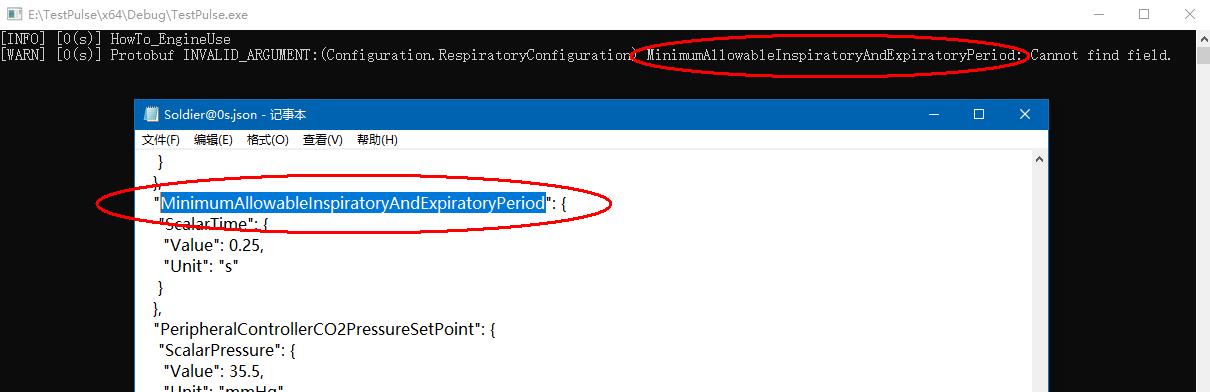
Try changing that string to `MinimumAllowableInpiratoryAndExpiratoryPeriod`
---
### Author:  [@abray](https://discourse.kitware.com/u/abray)
#### Post date: [July 22, 2020, 11:31am UTC](https://discourse.kitware.com/t/states/503/11 "2020-07-22T11:31:31Z")
If you have built Pulse, you can run directly from Visual Studio following these instructions
[https://gitlab.kitware.com/physiology/engine/-/wikis/Using-MSVC#running-the-how-to-examples](https://gitlab.kitware.com/physiology/engine/-/wikis/Using-MSVC#running-the-how-to-examples)
How did you create your TestPulse?
I believe it is out of sync with your Pulse build (hence why I believe reverting back to a misspelled variable in my previous post might fix your application)