# Struggle to get the windtunnel modelbuilder running properly
**URL:** https://discourse.kitware.com/t/struggle-to-get-the-windtunnel-modelbuilder-running-properly/1230
**Category:** Computational Model Builder (CMB)
**Created:** [February 27, 2024, 3:11pm UTC](https://discourse.kitware.com/t/struggle-to-get-the-windtunnel-modelbuilder-running-properly/1230 "2024-02-27T15:11:33Z")
**Posts on this page:** 20
**Page:** 1
### Author:  [@julien-siguenza](https://discourse.kitware.com/u/julien-siguenza)
#### Post date: [February 27, 2024, 3:11pm UTC](https://discourse.kitware.com/t/struggle-to-get-the-windtunnel-modelbuilder-running-properly/1230/1 "2024-02-27T15:11:33Z")
Hi everybody,
I am starting using Computational Model Builder and I have some troubles to understand properly how it works.
I am working on a Windows11 system with an Ubuntu 22.04 distribution installed trough WSL :
- I tried to download the package modelbuilder-windtunnel-centos7-240220.tar.gz on my Ubuntu distribution and unpacked everything.
- I have installed openFOAM with Docker container engine.
- I tried to execute ./modelerbuilder contained in the bin directory.
The CMB interface is starting to open but I finally end up with a crash:
=============================================================================
Start container engine setup
Read settings ContainerEnginePath: .
Program: “docker”
Args: (“image”, “ls”, “-q”, “–no-trunc”, “opencfd/openfoam-run:2112”)
Wrote settings ContainerEnginePath: “docker”
Wind Tunnel plugin initialized.
D3D12: Removing Device.
Loguru caught a signal: SIGSEGV
Stack trace:
64 0x40fded ./modelbuilder() [0x40fded]
63 0x7f5f4c3d4e40 \_\_libc\_start\_main + 128
62 0x7f5f4c3d4d90 /lib/x86\_64-linux-gnu/libc.so.6(+0x29d90) [0x7f5f4c3d4d90]
61 0x40f8b0 ./modelbuilder() [0x40f8b0]
60 0x41cf84 ./modelbuilder() [0x41cf84]
59 0x7f5f66cf474a QSplashScreen::finish(QWidget\*) + 122
58 0x7f5f658a71e1 QCoreApplication::processEvents(QFlagsQEventLoop::ProcessEventsFlag, int) + 113
57 0x7f5f37e58063 /home/jsiguenza/install/modelbuilder-windtunnel-centos7-240220/plugins/platforms/…/…/lib/libQt5XcbQpa.so.5(+0x58063) [0x7f5f37e58063]
56 0x7f5f660f9aab QWindowSystemInterface::sendWindowSystemEvents(QFlagsQEventLoop::ProcessEventsFlag) + 171
55 0x7f5f6611fd55 QGuiApplicationPrivate::processWindowSystemEvent(QWindowSystemInterfacePrivate::WindowSystemEvent\*) + 261
54 0x7f5f6611e88b QGuiApplicationPrivate::processMouseEvent(QWindowSystemInterfacePrivate::MouseEvent\*) + 1051
53 0x7f5f658a70c3 QCoreApplication::notifyInternal2(QObject\*, QEvent\*) + 259
52 0x7f5f66b6552f QApplication::notify(QObject\*, QEvent\*) + 543
51 0x7f5f66b5ebec QApplicationPrivate::notify\_helper(QObject\*, QEvent\*) + 156
50 0x7f5f66bb9a6b /home/jsiguenza/install/modelbuilder-windtunnel-centos7-240220/bin/…/lib/libQt5Widgets.so.5(+0x1b9a6b) [0x7f5f66bb9a6b]
49 0x7f5f66bb6cda /home/jsiguenza/install/modelbuilder-windtunnel-centos7-240220/bin/…/lib/libQt5Widgets.so.5(+0x1b6cda) [0x7f5f66bb6cda]
48 0x7f5f66b64b3c QApplicationPrivate::sendMouseEvent(QWidget\*, QMouseEvent\*, QWidget\*, QWidget\*, QWidget\*\*, QPointer&, bool, bool) + 460
47 0x7f5f658a70c3 QCoreApplication::notifyInternal2(QObject\*, QEvent\*) + 259
46 0x7f5f66b663a7 QApplication::notify(QObject\*, QEvent\*) + 4247
45 0x7f5f66b5ebec QApplicationPrivate::notify\_helper(QObject\*, QEvent\*) + 156
44 0x7f5f6822f5ca QVTKOpenGLNativeWidget::event(QEvent\*) + 26
43 0x7f5f6822d058 QVTKInteractorAdapter::ProcessEvent(QEvent\*, vtkRenderWindowInteractor\*) + 3608
42 0x7f5f4e56849a /home/jsiguenza/install/modelbuilder-windtunnel-centos7-240220/bin/…/lib/libvtkCommon-pv5.11.so.1(+0xd6849a) [0x7f5f4e56849a]
41 0x7f5f4e439b29 vtkCallbackCommand::Execute(vtkObject\*, unsigned long, void\*) + 25
40 0x7f5f5a17261e vtkCameraOrientationWidget::MoveAction(vtkAbstractWidget\*) + 158
39 0x7f5f5a172548 vtkCameraOrientationWidget::ComputeWidgetState(int, int, int) + 168
38 0x7f5f4e56849a /home/jsiguenza/install/modelbuilder-windtunnel-centos7-240220/bin/…/lib/libvtkCommon-pv5.11.so.1(+0xd6849a) [0x7f5f4e56849a]
37 0x7f5f650082d8 vtkSMViewProxyInteractorHelper::Execute(vtkObject\*, unsigned long, void\*) + 360
36 0x7f5f65008046 vtkSMViewProxyInteractorHelper::Render() + 486
35 0x7f5f6500467a vtkSMViewProxy::InteractiveRender() + 346
34 0x7f5f65039595 vtkPVSessionBase::ExecuteStream(unsigned int, vtkClientServerStream const&, bool) + 53
33 0x7f5f6503a86b vtkPVSessionCore::ExecuteStream(unsigned int, vtkClientServerStream const&, bool) + 59
32 0x7f5f6503aa32 vtkPVSessionCore::ExecuteStreamInternal(vtkClientServerStream const&, bool) + 242
31 0x7f5f6428f69d vtkClientServerInterpreter::ProcessStream(vtkClientServerStream const&) + 29
30 0x7f5f6428f3fe vtkClientServerInterpreter::ProcessOneMessage(vtkClientServerStream const&, int) + 1278
29 0x7f5f6428ecdd vtkClientServerInterpreter::ProcessCommandInvoke(vtkClientServerStream const&, int) + 1213
28 0x7f5f6428e523 vtkClientServerInterpreter::CallCommandFunction(char const\*, vtkObjectBase\*, char const\*, vtkClientServerStream const&, vtkClientServerStream&) + 355
27 0x7f5f48c20210 vtkPVRenderViewCommand(vtkClientServerInterpreter\*, vtkObjectBase\*, char const\*, vtkClientServerStream const&, vtkClientServerStream&, void\*) + 9696
26 0x7f5f64f42872 vtkPVRenderView::InteractiveRender() + 114
25 0x7f5f64f4fa4b vtkPVRenderView::Render(bool, bool) + 2379
24 0x7f5f5ab43302 vtkGenericOpenGLRenderWindow::Render() + 194
23 0x7f5f5abd7b61 vtkOpenGLRenderWindow::Render() + 81
22 0x7f5f5843cbf3 vtkRenderWindow::Render() + 259
21 0x7f5f5843c265 vtkRenderWindow::DoStereoRender() + 213
20 0x7f5f5845056f vtkRendererCollection::Render() + 191
19 0x7f5f58449605 vtkRenderer::Render() + 2533
18 0x7f5f5abdd52b vtkOpenGLRenderer::DeviceRender() + 555
17 0x7f5f5abdbc04 vtkOpenGLRenderer::UpdateGeometry(vtkFrameBufferObjectBase\*) + 2340
16 0x7f5f5ab4eec0 vtkOpenGLFXAAFilter::Execute(vtkOpenGLRenderer\*) + 96
15 0x7f5f5ab4ee2d vtkOpenGLFXAAFilter::PrintBenchmark() + 13
14 0x7f5f5abc2f4f vtkOpenGLRenderTimer::Ready() + 47
13 0x7f5f34704df5 /usr/lib/x86\_64-linux-gnu/dri/swrast\_dri.so(+0x37edf5) [0x7f5f34704df5]
12 0x7f5f34703771 /usr/lib/x86\_64-linux-gnu/dri/swrast\_dri.so(+0x37d771) [0x7f5f34703771]
11 0x7f5f34702e8a /usr/lib/x86\_64-linux-gnu/dri/swrast\_dri.so(+0x37ce8a) [0x7f5f34702e8a]
10 0x7f5f349d07d8 /usr/lib/x86\_64-linux-gnu/dri/swrast\_dri.so(+0x64a7d8) [0x7f5f349d07d8]
9 0x7f5f349d057b /usr/lib/x86\_64-linux-gnu/dri/swrast\_dri.so(+0x64a57b) [0x7f5f349d057b]
8 0x7f5f349cf612 /usr/lib/x86\_64-linux-gnu/dri/swrast\_dri.so(+0x649612) [0x7f5f349cf612]
7 0x7f5f349cf363 /usr/lib/x86\_64-linux-gnu/dri/swrast\_dri.so(+0x649363) [0x7f5f349cf363]
6 0x7f5f34edc2d0 /usr/lib/x86\_64-linux-gnu/dri/swrast\_dri.so(+0xb562d0) [0x7f5f34edc2d0]
5 0x7f5f34edc18a /usr/lib/x86\_64-linux-gnu/dri/swrast\_dri.so(+0xb5618a) [0x7f5f34edc18a]
4 0x7f5f28cf6c42 /usr/lib/wsl/lib/libd3d12core.so(+0x395c42) [0x7f5f28cf6c42]
3 0x7f5f28cf6e12 /usr/lib/wsl/lib/libd3d12core.so(+0x395e12) [0x7f5f28cf6e12]
2 0x7f5f28292ec7 /usr/lib/wsl/drivers/iigd\_dch.inf\_amd64\_89d4d93fe5389cc3/libigd12um64xel.so(+0x48ec7) [0x7f5f28292ec7]
1 0x7f5f28401293 /usr/lib/wsl/drivers/iigd\_dch.inf\_amd64\_89d4d93fe5389cc3/libigd12um64xel.so(+0x1b7293) [0x7f5f28401293]
0 0x7f5f4c3ed520 /lib/x86\_64-linux-gnu/libc.so.6(+0x42520) [0x7f5f4c3ed520]
( 1.020s) [paraview] :0 FATL| Signal: SIGSEGV
Segmentation fault
=============================================================================
Could anyone help me fix this issue?
Maybe I missed something trivial…
Thanks,
Julien
---
### Author:  [@johnt](https://discourse.kitware.com/u/johnt)
#### Post date: [February 27, 2024, 4:55pm UTC](https://discourse.kitware.com/t/struggle-to-get-the-windtunnel-modelbuilder-running-properly/1230/2 "2024-02-27T16:55:17Z")
So something in the graphics is not well.
1. Just to make sure, did you install the WSL graphics driver for your machine? You can get them at [this Microsoft link](https://learn.microsoft.com/en-us/windows/wsl/tutorials/gui-apps#prerequisites).
2. If you already have, can you successfully run `glxinfo` and `glxgears` from your WSL terminal?
---
### Author:  [@julien-siguenza](https://discourse.kitware.com/u/julien-siguenza)
#### Post date: [February 27, 2024, 8:55pm UTC](https://discourse.kitware.com/t/struggle-to-get-the-windtunnel-modelbuilder-running-properly/1230/3 "2024-02-27T20:55:03Z")
Hi johnt,
Nice to meet you and thank you for your prompt feedback!
I already updated the WSL graphics driver for my NVIDIA RTX 2000 Ada Generation graphic card.
It seems that the glxinfo and glxgears command line are not recognized by my WSL terminal:
```auto
-bash: glxinfo: command not found
-bash: glxgears: command not found
```
Thanks for helping!
---
### Author:  [@johnt](https://discourse.kitware.com/u/johnt)
#### Post date: [February 27, 2024, 10:42pm UTC](https://discourse.kitware.com/t/struggle-to-get-the-windtunnel-modelbuilder-running-properly/1230/4 "2024-02-27T22:42:16Z")
Glad to help, Julien, and thanks for trying modelbuilder. I have not run modelbuilder on windows or WSL in awhile. Checking back in my notes (thank goodness for Evernote), I needed to install these 2 libraries in order to run modelbuilder on WSL:
```auto
> sudo apt install libopengl0
> sudo apt install libxkbcommon-x11-0
```
Please try that and let us know. If modelbuilder still doesn’t start up, also check again for `glxinfo` and `glxgears`.
–john
---
### Author:  [@julien-siguenza](https://discourse.kitware.com/u/julien-siguenza)
#### Post date: [February 27, 2024, 11:02pm UTC](https://discourse.kitware.com/t/struggle-to-get-the-windtunnel-modelbuilder-running-properly/1230/5 "2024-02-27T23:02:09Z")
I am a big user of paraview and VTK since a few years now.
It looks like what you developed with modelbuilder is really powerfull when you are into simulation.
I would like to be able to develop new plugins for other simulation code, like FEniCSx or code\_aster.
But for now I need to be able to setup a proper installation.
Unfortunately the libraries you are talking about were already installed on my system.
What is strange is that I succeeded to run properly the common modelbuilder as well as cmb2d.
So I don’t understand why I end up with this issue for the WindTunnel version.
Anyway I appreciate your effort to help me fix this issue.
Do you have any other track to suggest to me?
Thanks!
---
### Author:  [@julien-siguenza](https://discourse.kitware.com/u/julien-siguenza)
#### Post date: [February 27, 2024, 11:28pm UTC](https://discourse.kitware.com/t/struggle-to-get-the-windtunnel-modelbuilder-running-properly/1230/6 "2024-02-27T23:28:57Z")
Oh! It seems that `glxinfo` and `glxgears` commands were not recognized because I needed to install the following library:
`sudo apt install mesa-utils`
So the `glxinfo` command gives a very long message which starts with:
```auto
name of display: :0
display: :0 screen: 0
direct rendering: Yes
server glx vendor string: SGI
server glx version string: 1.4
server glx extensions:
GLX_ARB_context_flush_control, GLX_ARB_create_context,
GLX_ARB_create_context_no_error, GLX_ARB_create_context_profile,
GLX_ARB_fbconfig_float, GLX_ARB_framebuffer_sRGB, GLX_ARB_multisample,
GLX_EXT_create_context_es2_profile, GLX_EXT_create_context_es_profile,
GLX_EXT_fbconfig_packed_float, GLX_EXT_framebuffer_sRGB,
GLX_EXT_import_context, GLX_EXT_libglvnd, GLX_EXT_no_config_context,
GLX_EXT_texture_from_pixmap, GLX_EXT_visual_info, GLX_EXT_visual_rating,
GLX_MESA_copy_sub_buffer, GLX_OML_swap_method, GLX_SGIS_multisample,
GLX_SGIX_fbconfig, GLX_SGIX_pbuffer, GLX_SGIX_visual_select_group,
GLX_SGI_make_current_read
client glx vendor string: Mesa Project and SGI
client glx version string: 1.4
client glx extensions:
GLX_ARB_context_flush_control, GLX_ARB_create_context,
GLX_ARB_create_context_no_error, GLX_ARB_create_context_profile,
GLX_ARB_create_context_robustness, GLX_ARB_fbconfig_float,
GLX_ARB_framebuffer_sRGB, GLX_ARB_get_proc_address, GLX_ARB_multisample,
GLX_ATI_pixel_format_float, GLX_EXT_buffer_age,
GLX_EXT_create_context_es2_profile, GLX_EXT_create_context_es_profile,
GLX_EXT_fbconfig_packed_float, GLX_EXT_framebuffer_sRGB,
GLX_EXT_import_context, GLX_EXT_no_config_context, GLX_EXT_swap_control,
GLX_EXT_swap_control_tear, GLX_EXT_texture_from_pixmap,
GLX_EXT_visual_info, GLX_EXT_visual_rating, GLX_INTEL_swap_event,
GLX_MESA_copy_sub_buffer, GLX_MESA_query_renderer, GLX_MESA_swap_control,
GLX_NV_float_buffer, GLX_OML_swap_method, GLX_OML_sync_control,
GLX_SGIS_multisample, GLX_SGIX_fbconfig, GLX_SGIX_pbuffer,
GLX_SGIX_visual_select_group, GLX_SGI_make_current_read,
GLX_SGI_swap_control, GLX_SGI_video_sync
GLX version: 1.4
GLX extensions:
GLX_ARB_context_flush_control, GLX_ARB_create_context,
GLX_ARB_create_context_no_error, GLX_ARB_create_context_profile,
GLX_ARB_fbconfig_float, GLX_ARB_framebuffer_sRGB,
GLX_ARB_get_proc_address, GLX_ARB_multisample,
GLX_EXT_create_context_es2_profile, GLX_EXT_create_context_es_profile,
GLX_EXT_fbconfig_packed_float, GLX_EXT_framebuffer_sRGB,
GLX_EXT_import_context, GLX_EXT_no_config_context,
GLX_EXT_texture_from_pixmap, GLX_EXT_visual_info, GLX_EXT_visual_rating,
GLX_MESA_copy_sub_buffer, GLX_MESA_query_renderer, GLX_OML_swap_method,
GLX_SGIS_multisample, GLX_SGIX_fbconfig, GLX_SGIX_pbuffer,
GLX_SGIX_visual_select_group, GLX_SGI_make_current_read
Extended renderer info (GLX_MESA_query_renderer):
Vendor: Microsoft Corporation (0xffffffff)
Device: D3D12 (Intel(R) UHD Graphics) (0xffffffff)
Version: 23.0.4
Accelerated: yes
Video memory: 16340MB
Unified memory: yes
Preferred profile: core (0x1)
Max core profile version: 4.1
Max compat profile version: 4.1
Max GLES1 profile version: 1.1
Max GLES[23] profile version: 3.0
OpenGL vendor string: Microsoft Corporation
OpenGL renderer string: D3D12 (Intel(R) UHD Graphics)
OpenGL core profile version string: 4.1 (Core Profile) Mesa 23.0.4-0ubuntu1~22.04.1
OpenGL core profile shading language version string: 4.10
OpenGL core profile context flags: (none)
OpenGL core profile profile mask: core profile
OpenGL core profile extensions:
GL_AMD_conservative_depth, GL_AMD_draw_buffers_blend,
GL_AMD_gpu_shader_int64, GL_AMD_multi_draw_indirect,
GL_AMD_shader_stencil_export, GL_AMD_shader_trinary_minmax,
GL_AMD_texture_texture4, GL_ANGLE_texture_compression_dxt3,
GL_ANGLE_texture_compression_dxt5, GL_ARB_ES2_compatibility,
GL_ARB_ES3_compatibility, GL_ARB_arrays_of_arrays, GL_ARB_base_instance,
GL_ARB_blend_func_extended, GL_ARB_buffer_storage,
GL_ARB_clear_buffer_object, GL_ARB_clip_control,
GL_ARB_compressed_texture_pixel_storage,
GL_ARB_conditional_render_inverted, GL_ARB_conservative_depth,
GL_ARB_copy_buffer, GL_ARB_debug_output, GL_ARB_depth_buffer_float,
GL_ARB_depth_clamp, GL_ARB_direct_state_access, GL_ARB_draw_buffers,
GL_ARB_draw_buffers_blend, GL_ARB_draw_elements_base_vertex,
GL_ARB_draw_indirect, GL_ARB_draw_instanced,
GL_ARB_explicit_attrib_location, GL_ARB_explicit_uniform_location,
GL_ARB_fragment_coord_conventions, GL_ARB_fragment_layer_viewport,
GL_ARB_fragment_shader, GL_ARB_framebuffer_no_attachments,
GL_ARB_framebuffer_object, GL_ARB_framebuffer_sRGB,
GL_ARB_get_program_binary, GL_ARB_get_texture_sub_image,
GL_ARB_gpu_shader5, GL_ARB_gpu_shader_fp64, GL_ARB_gpu_shader_int64,
GL_ARB_half_float_pixel, GL_ARB_half_float_vertex,
GL_ARB_indirect_parameters, GL_ARB_instanced_arrays,
GL_ARB_internalformat_query, GL_ARB_internalformat_query2,
GL_ARB_invalidate_subdata, GL_ARB_map_buffer_alignment,
GL_ARB_map_buffer_range, GL_ARB_multi_bind, GL_ARB_multi_draw_indirect,
GL_ARB_occlusion_query2, GL_ARB_parallel_shader_compile,
GL_ARB_pixel_buffer_object, GL_ARB_point_sprite,
GL_ARB_program_interface_query, GL_ARB_provoking_vertex,
GL_ARB_robust_buffer_access_behavior, GL_ARB_robustness,
GL_ARB_sample_shading, GL_ARB_sampler_objects, GL_ARB_seamless_cube_map,
GL_ARB_separate_shader_objects, GL_ARB_shader_atomic_counter_ops,
GL_ARB_shader_atomic_counters, GL_ARB_shader_bit_encoding,
GL_ARB_shader_draw_parameters, GL_ARB_shader_objects,
GL_ARB_shader_precision, GL_ARB_shader_stencil_export,
GL_ARB_shader_storage_buffer_object, GL_ARB_shader_subroutine,
GL_ARB_shader_texture_lod, GL_ARB_shading_language_420pack,
GL_ARB_shading_language_include, GL_ARB_shading_language_packing,
GL_ARB_stencil_texturing, GL_ARB_sync, GL_ARB_tessellation_shader,
GL_ARB_texture_buffer_object, GL_ARB_texture_buffer_object_rgb32,
GL_ARB_texture_buffer_range, GL_ARB_texture_compression_bptc,
GL_ARB_texture_compression_rgtc, GL_ARB_texture_cube_map_array,
GL_ARB_texture_filter_anisotropic, GL_ARB_texture_float,
GL_ARB_texture_gather, GL_ARB_texture_multisample,
GL_ARB_texture_non_power_of_two, GL_ARB_texture_query_levels,
GL_ARB_texture_query_lod, GL_ARB_texture_rectangle, GL_ARB_texture_rg,
GL_ARB_texture_rgb10_a2ui, GL_ARB_texture_stencil8,
GL_ARB_texture_storage, GL_ARB_texture_storage_multisample,
GL_ARB_texture_swizzle, GL_ARB_timer_query, GL_ARB_transform_feedback2,
GL_ARB_transform_feedback3, GL_ARB_transform_feedback_instanced,
GL_ARB_uniform_buffer_object, GL_ARB_vertex_array_bgra,
GL_ARB_vertex_array_object, GL_ARB_vertex_attrib_64bit,
GL_ARB_vertex_attrib_binding, GL_ARB_vertex_buffer_object,
GL_ARB_vertex_shader, GL_ARB_vertex_type_10f_11f_11f_rev,
GL_ARB_vertex_type_2_10_10_10_rev, GL_ARB_viewport_array,
GL_ATI_blend_equation_separate, GL_ATI_texture_float,
GL_EXT_EGL_image_storage, GL_EXT_EGL_sync, GL_EXT_abgr,
GL_EXT_blend_equation_separate, GL_EXT_debug_label, GL_EXT_draw_buffers2,
GL_EXT_draw_instanced, GL_EXT_framebuffer_blit,
GL_EXT_framebuffer_multisample, GL_EXT_framebuffer_multisample_blit_scaled,
GL_EXT_framebuffer_object, GL_EXT_framebuffer_sRGB, GL_EXT_memory_object,
GL_EXT_memory_object_fd, GL_EXT_packed_depth_stencil, GL_EXT_packed_float,
GL_EXT_pixel_buffer_object, GL_EXT_provoking_vertex, GL_EXT_semaphore,
GL_EXT_semaphore_fd, GL_EXT_shader_integer_mix, GL_EXT_texture_array,
GL_EXT_texture_compression_dxt1, GL_EXT_texture_compression_rgtc,
GL_EXT_texture_compression_s3tc, GL_EXT_texture_filter_anisotropic,
GL_EXT_texture_integer, GL_EXT_texture_sRGB, GL_EXT_texture_sRGB_decode,
GL_EXT_texture_shared_exponent, GL_EXT_texture_snorm,
GL_EXT_texture_swizzle, GL_EXT_timer_query, GL_EXT_transform_feedback,
GL_EXT_vertex_array_bgra, GL_EXT_vertex_attrib_64bit,
GL_IBM_multimode_draw_arrays, GL_KHR_context_flush_control, GL_KHR_debug,
GL_KHR_no_error, GL_KHR_parallel_shader_compile,
GL_KHR_robust_buffer_access_behavior, GL_KHR_robustness,
GL_KHR_texture_compression_astc_ldr,
GL_KHR_texture_compression_astc_sliced_3d, GL_MESA_pack_invert,
GL_MESA_shader_integer_functions, GL_MESA_texture_signed_rgba,
GL_NV_conditional_render, GL_NV_copy_image, GL_NV_depth_clamp,
GL_NV_packed_depth_stencil, GL_NV_vdpau_interop, GL_OES_EGL_image,
GL_S3_s3tc
OpenGL version string: 4.1 (Compatibility Profile) Mesa 23.0.4-0ubuntu1~22.04.1
OpenGL shading language version string: 4.10
OpenGL context flags: (none)
OpenGL profile mask: compatibility profile
OpenGL extensions:
GL_AMD_conservative_depth, GL_AMD_draw_buffers_blend,
GL_AMD_multi_draw_indirect, GL_AMD_shader_stencil_export,
GL_AMD_shader_trinary_minmax, GL_AMD_texture_texture4,
GL_ANGLE_texture_compression_dxt3, GL_ANGLE_texture_compression_dxt5,
GL_APPLE_packed_pixels, GL_ARB_ES2_compatibility,
GL_ARB_ES3_compatibility, GL_ARB_arrays_of_arrays, GL_ARB_base_instance,
GL_ARB_blend_func_extended, GL_ARB_buffer_storage,
GL_ARB_clear_buffer_object, GL_ARB_clip_control,
GL_ARB_color_buffer_float, GL_ARB_compatibility,
GL_ARB_compressed_texture_pixel_storage,
GL_ARB_conditional_render_inverted, GL_ARB_conservative_depth,
GL_ARB_copy_buffer, GL_ARB_debug_output, GL_ARB_depth_buffer_float,
GL_ARB_depth_clamp, GL_ARB_depth_texture, GL_ARB_direct_state_access,
GL_ARB_draw_buffers, GL_ARB_draw_buffers_blend,
GL_ARB_draw_elements_base_vertex, GL_ARB_draw_indirect,
GL_ARB_draw_instanced, GL_ARB_explicit_attrib_location,
GL_ARB_explicit_uniform_location, GL_ARB_fragment_coord_conventions,
GL_ARB_fragment_layer_viewport, GL_ARB_fragment_program,
GL_ARB_fragment_program_shadow, GL_ARB_fragment_shader,
GL_ARB_framebuffer_no_attachments, GL_ARB_framebuffer_object,
GL_ARB_framebuffer_sRGB, GL_ARB_get_program_binary,
GL_ARB_get_texture_sub_image, GL_ARB_gpu_shader5, GL_ARB_gpu_shader_fp64,
GL_ARB_gpu_shader_int64, GL_ARB_half_float_pixel,
GL_ARB_half_float_vertex, GL_ARB_indirect_parameters,
GL_ARB_instanced_arrays, GL_ARB_internalformat_query,
GL_ARB_internalformat_query2, GL_ARB_invalidate_subdata,
GL_ARB_map_buffer_alignment, GL_ARB_map_buffer_range, GL_ARB_multi_bind,
GL_ARB_multi_draw_indirect, GL_ARB_multisample, GL_ARB_multitexture,
GL_ARB_occlusion_query, GL_ARB_occlusion_query2,
GL_ARB_parallel_shader_compile, GL_ARB_pixel_buffer_object,
GL_ARB_point_parameters, GL_ARB_point_sprite,
GL_ARB_program_interface_query, GL_ARB_provoking_vertex,
GL_ARB_robust_buffer_access_behavior, GL_ARB_robustness,
GL_ARB_sample_shading, GL_ARB_sampler_objects, GL_ARB_seamless_cube_map,
GL_ARB_separate_shader_objects, GL_ARB_shader_atomic_counter_ops,
GL_ARB_shader_atomic_counters, GL_ARB_shader_bit_encoding,
GL_ARB_shader_draw_parameters, GL_ARB_shader_objects,
GL_ARB_shader_precision, GL_ARB_shader_stencil_export,
GL_ARB_shader_storage_buffer_object, GL_ARB_shader_subroutine,
GL_ARB_shader_texture_lod, GL_ARB_shading_language_100,
GL_ARB_shading_language_420pack, GL_ARB_shading_language_include,
GL_ARB_shading_language_packing, GL_ARB_shadow, GL_ARB_stencil_texturing,
GL_ARB_sync, GL_ARB_tessellation_shader, GL_ARB_texture_border_clamp,
GL_ARB_texture_buffer_object, GL_ARB_texture_buffer_object_rgb32,
GL_ARB_texture_buffer_range, GL_ARB_texture_compression,
GL_ARB_texture_compression_bptc, GL_ARB_texture_compression_rgtc,
GL_ARB_texture_cube_map, GL_ARB_texture_cube_map_array,
GL_ARB_texture_env_add, GL_ARB_texture_env_combine,
GL_ARB_texture_env_crossbar, GL_ARB_texture_env_dot3,
GL_ARB_texture_filter_anisotropic, GL_ARB_texture_float,
GL_ARB_texture_gather, GL_ARB_texture_mirrored_repeat,
GL_ARB_texture_multisample, GL_ARB_texture_non_power_of_two,
GL_ARB_texture_query_levels, GL_ARB_texture_query_lod,
GL_ARB_texture_rectangle, GL_ARB_texture_rg, GL_ARB_texture_rgb10_a2ui,
GL_ARB_texture_stencil8, GL_ARB_texture_storage,
GL_ARB_texture_storage_multisample, GL_ARB_texture_swizzle,
GL_ARB_timer_query, GL_ARB_transform_feedback2,
GL_ARB_transform_feedback3, GL_ARB_transform_feedback_instanced,
GL_ARB_transpose_matrix, GL_ARB_uniform_buffer_object,
GL_ARB_vertex_array_bgra, GL_ARB_vertex_array_object,
GL_ARB_vertex_attrib_64bit, GL_ARB_vertex_attrib_binding,
GL_ARB_vertex_buffer_object, GL_ARB_vertex_program, GL_ARB_vertex_shader,
GL_ARB_vertex_type_10f_11f_11f_rev, GL_ARB_vertex_type_2_10_10_10_rev,
GL_ARB_viewport_array, GL_ARB_window_pos, GL_ATI_blend_equation_separate,
GL_ATI_draw_buffers, GL_ATI_fragment_shader, GL_ATI_separate_stencil,
GL_ATI_texture_env_combine3, GL_ATI_texture_float,
GL_EXT_EGL_image_storage, GL_EXT_EGL_sync, GL_EXT_abgr, GL_EXT_bgra,
GL_EXT_blend_color, GL_EXT_blend_equation_separate,
GL_EXT_blend_func_separate, GL_EXT_blend_minmax, GL_EXT_blend_subtract,
GL_EXT_compiled_vertex_array, GL_EXT_copy_texture, GL_EXT_debug_label,
GL_EXT_direct_state_access, GL_EXT_draw_buffers2, GL_EXT_draw_instanced,
GL_EXT_draw_range_elements, GL_EXT_fog_coord, GL_EXT_framebuffer_blit,
GL_EXT_framebuffer_multisample, GL_EXT_framebuffer_multisample_blit_scaled,
GL_EXT_framebuffer_object, GL_EXT_framebuffer_sRGB,
GL_EXT_gpu_program_parameters, GL_EXT_gpu_shader4, GL_EXT_memory_object,
GL_EXT_memory_object_fd, GL_EXT_multi_draw_arrays,
GL_EXT_packed_depth_stencil, GL_EXT_packed_float, GL_EXT_packed_pixels,
GL_EXT_pixel_buffer_object, GL_EXT_point_parameters,
GL_EXT_provoking_vertex, GL_EXT_rescale_normal, GL_EXT_secondary_color,
GL_EXT_semaphore, GL_EXT_semaphore_fd, GL_EXT_separate_specular_color,
GL_EXT_shader_integer_mix, GL_EXT_shadow_funcs, GL_EXT_stencil_two_side,
GL_EXT_stencil_wrap, GL_EXT_subtexture, GL_EXT_texture, GL_EXT_texture3D,
GL_EXT_texture_array, GL_EXT_texture_buffer_object,
GL_EXT_texture_compression_dxt1, GL_EXT_texture_compression_rgtc,
GL_EXT_texture_compression_s3tc, GL_EXT_texture_cube_map,
GL_EXT_texture_edge_clamp, GL_EXT_texture_env_add,
GL_EXT_texture_env_combine, GL_EXT_texture_env_dot3,
GL_EXT_texture_filter_anisotropic, GL_EXT_texture_integer,
GL_EXT_texture_lod_bias, GL_EXT_texture_object, GL_EXT_texture_rectangle,
GL_EXT_texture_sRGB, GL_EXT_texture_sRGB_decode,
GL_EXT_texture_shared_exponent, GL_EXT_texture_snorm,
GL_EXT_texture_swizzle, GL_EXT_timer_query, GL_EXT_transform_feedback,
GL_EXT_vertex_array, GL_EXT_vertex_array_bgra, GL_EXT_vertex_attrib_64bit,
GL_IBM_multimode_draw_arrays, GL_IBM_rasterpos_clip,
GL_IBM_texture_mirrored_repeat, GL_INGR_blend_func_separate,
GL_KHR_context_flush_control, GL_KHR_debug, GL_KHR_no_error,
GL_KHR_parallel_shader_compile, GL_KHR_robust_buffer_access_behavior,
GL_KHR_robustness, GL_KHR_texture_compression_astc_ldr,
GL_KHR_texture_compression_astc_sliced_3d, GL_MESA_pack_invert,
GL_MESA_shader_integer_functions, GL_MESA_texture_signed_rgba,
GL_MESA_window_pos, GL_NV_ES1_1_compatibility, GL_NV_blend_square,
GL_NV_conditional_render, GL_NV_copy_image, GL_NV_depth_clamp,
GL_NV_fog_distance, GL_NV_half_float, GL_NV_light_max_exponent,
GL_NV_packed_depth_stencil, GL_NV_primitive_restart,
GL_NV_texgen_reflection, GL_NV_texture_env_combine4,
GL_NV_texture_rectangle, GL_NV_vdpau_interop, GL_OES_EGL_image,
GL_OES_read_format, GL_S3_s3tc, GL_SGIS_generate_mipmap,
GL_SGIS_texture_border_clamp, GL_SGIS_texture_edge_clamp,
GL_SGIS_texture_lod, GL_SUN_multi_draw_arrays
OpenGL ES profile version string: OpenGL ES 3.0 Mesa 23.0.4-0ubuntu1~22.04.1
OpenGL ES profile shading language version string: OpenGL ES GLSL ES 3.00
OpenGL ES profile extensions:
GL_ANGLE_pack_reverse_row_order, GL_ANGLE_texture_compression_dxt3,
GL_ANGLE_texture_compression_dxt5, GL_APPLE_texture_max_level,
GL_EXT_EGL_image_storage, GL_EXT_base_instance,
GL_EXT_blend_func_extended, GL_EXT_blend_minmax, GL_EXT_clip_control,
GL_EXT_color_buffer_float, GL_EXT_compressed_ETC1_RGB8_sub_texture,
GL_EXT_debug_label, GL_EXT_depth_clamp, GL_EXT_discard_framebuffer,
GL_EXT_disjoint_timer_query, GL_EXT_draw_buffers,
GL_EXT_draw_buffers_indexed, GL_EXT_draw_elements_base_vertex,
GL_EXT_draw_instanced, GL_EXT_float_blend, GL_EXT_frag_depth,
GL_EXT_map_buffer_range, GL_EXT_memory_object, GL_EXT_memory_object_fd,
GL_EXT_multi_draw_arrays, GL_EXT_occlusion_query_boolean,
GL_EXT_read_format_bgra, GL_EXT_robustness, GL_EXT_sRGB_write_control,
GL_EXT_semaphore, GL_EXT_semaphore_fd, GL_EXT_separate_shader_objects,
GL_EXT_shader_integer_mix, GL_EXT_texture_border_clamp,
GL_EXT_texture_compression_bptc, GL_EXT_texture_compression_dxt1,
GL_EXT_texture_compression_rgtc, GL_EXT_texture_compression_s3tc,
GL_EXT_texture_compression_s3tc_srgb, GL_EXT_texture_filter_anisotropic,
GL_EXT_texture_format_BGRA8888, GL_EXT_texture_query_lod,
GL_EXT_texture_rg, GL_EXT_texture_sRGB_decode,
GL_EXT_texture_type_2_10_10_10_REV, GL_EXT_unpack_subimage,
GL_KHR_context_flush_control, GL_KHR_debug, GL_KHR_no_error,
GL_KHR_parallel_shader_compile, GL_KHR_robust_buffer_access_behavior,
GL_KHR_robustness, GL_KHR_texture_compression_astc_ldr,
GL_KHR_texture_compression_astc_sliced_3d, GL_MESA_bgra,
GL_MESA_framebuffer_flip_y, GL_MESA_shader_integer_functions,
GL_NV_conditional_render, GL_NV_draw_buffers, GL_NV_fbo_color_attachments,
GL_NV_pack_subimage, GL_NV_pixel_buffer_object, GL_NV_read_buffer,
GL_NV_read_depth, GL_NV_read_depth_stencil, GL_NV_read_stencil,
GL_NV_shader_noperspective_interpolation, GL_OES_EGL_image,
GL_OES_EGL_image_external, GL_OES_EGL_image_external_essl3,
GL_OES_EGL_sync, GL_OES_compressed_ETC1_RGB8_texture, GL_OES_depth24,
GL_OES_depth_texture, GL_OES_depth_texture_cube_map,
GL_OES_draw_buffers_indexed, GL_OES_draw_elements_base_vertex,
GL_OES_element_index_uint, GL_OES_fbo_render_mipmap,
GL_OES_get_program_binary, GL_OES_mapbuffer, GL_OES_packed_depth_stencil,
GL_OES_required_internalformat, GL_OES_rgb8_rgba8, GL_OES_sample_shading,
GL_OES_sample_variables, GL_OES_shader_multisample_interpolation,
GL_OES_standard_derivatives, GL_OES_stencil8, GL_OES_surfaceless_context,
GL_OES_texture_3D, GL_OES_texture_border_clamp, GL_OES_texture_float,
GL_OES_texture_float_linear, GL_OES_texture_half_float,
GL_OES_texture_half_float_linear, GL_OES_texture_npot,
GL_OES_texture_stencil8, GL_OES_vertex_array_object,
GL_OES_vertex_half_float
456 GLX Visuals
visual x bf lv rg d st colorbuffer sr ax dp st accumbuffer ms cav
id dep cl sp sz l ci b ro r g b a F gb bf th cl r g b a ns b eat
----------------------------------------------------------------------------
0x023 24 tc 0 32 0 r y . 8 8 8 8 . . 0 24 8 0 0 0 0 0 0 None
0x024 24 dc 0 32 0 r y . 8 8 8 8 . . 0 24 8 0 0 0 0 0 0 None
0x332 24 tc 0 32 0 r . . 8 8 8 8 . . 0 0 0 0 0 0 0 0 0 None
0x333 24 tc 0 32 0 r . . 8 8 8 8 . . 0 0 0 16 16 16 16 0 0 Slow
0x334 24 tc 0 32 0 r y . 8 8 8 8 . . 0 0 0 0 0 0 0 0 0 None
...
```
And the command `glxgears` command gives a funny animation:
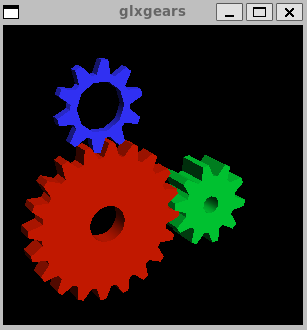
But I am maybe confused about the GPU driver I need to install.
Should it be on my Windows11 system or in my Ubuntu system, through a WSL terminal?
Because what I previously did was the first option.
I tried the second one, but I get this message:

---
### Author:  [@johnt](https://discourse.kitware.com/u/johnt)
#### Post date: [February 28, 2024, 3:33pm UTC](https://discourse.kitware.com/t/struggle-to-get-the-windtunnel-modelbuilder-running-properly/1230/7 "2024-02-28T15:33:07Z")
Never easy. Interesting that the other modelbuilder’s don’t crash - guess that’s a good thing . Perplexing because the windtunnel build uses the same CI resources as the other modelbuilders. A couple thoughts:
- Would you try starting modelbuilder with the `--dr` command line argument. It shouldn’t make any difference but there’s nothing to lose.
- One of the other developers here has a windows/wsl machine and volunteered to download and try the windtunnel app. I’ll report back on that.
- If you have the time, it would also be interesting to try our WaveTank build. What is interesting is that the WaveTank package was built on an Ubuntu 20.04 machine, whereas all of the others were built on Fedora machines. I would be curious to see what happens in WSL. If that seems to run ok, I could try making an Ubuntu build of the windtunnel modelbuilder to try. If you are up for it, the WaveTank package file is at [https://data.kitware.com/#collection/58fa68228d777f16d01e03e5/folder/65c7f4c64eafe12dcba8e19d](https://data.kitware.com/#collection/58fa68228d777f16d01e03e5/folder/65c7f4c64eafe12dcba8e19d)
---
### Author:  [@julien-siguenza](https://discourse.kitware.com/u/julien-siguenza)
#### Post date: [February 28, 2024, 3:49pm UTC](https://discourse.kitware.com/t/struggle-to-get-the-windtunnel-modelbuilder-running-properly/1230/8 "2024-02-28T15:49:48Z")
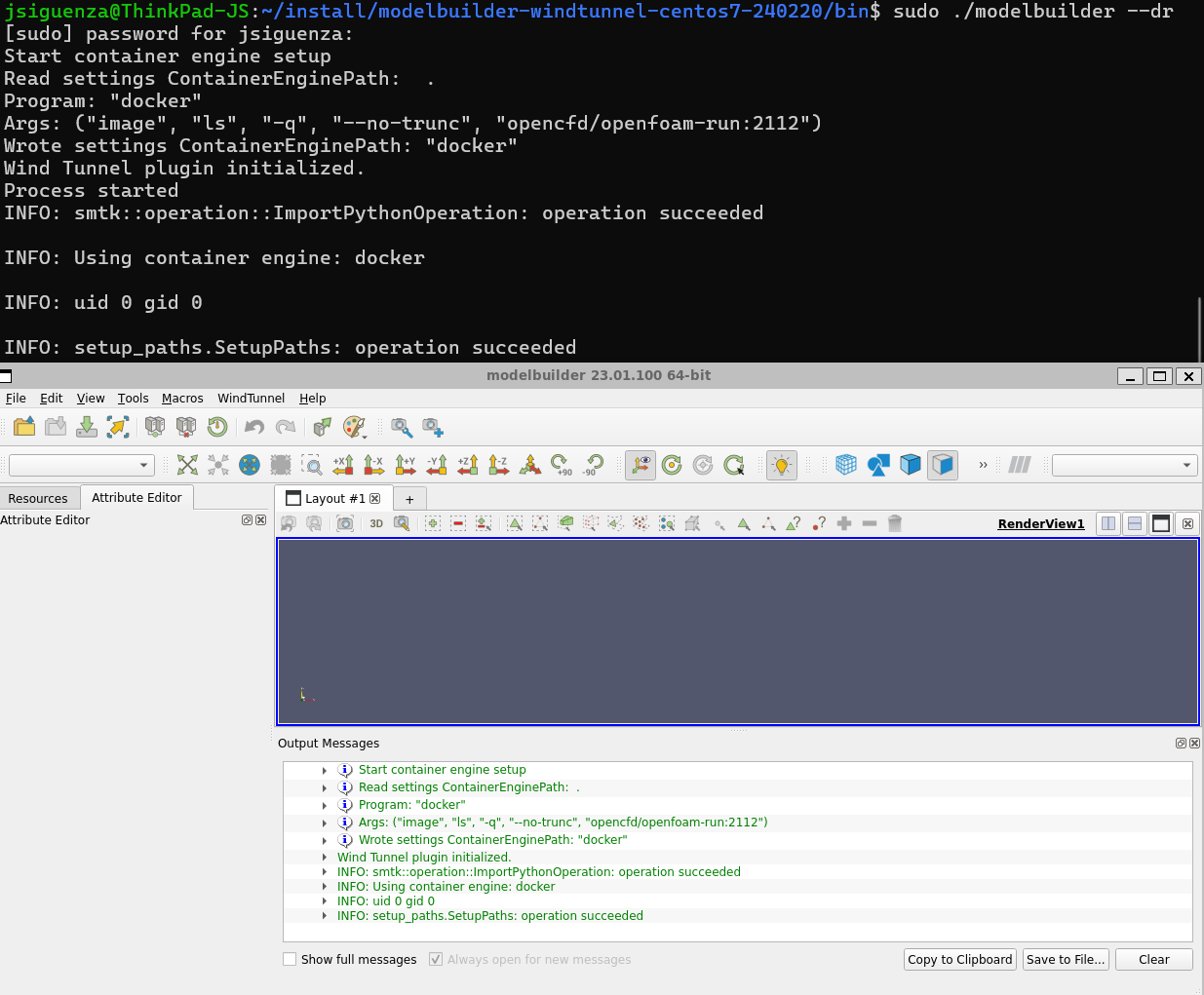
Unbelievable, starting the modelbuilder with the `--dr` command fixes the issue:
Thank you so much John!
Now I am going to test running some CFD simulations.
I’ll get back to you if I have new issues on my way.
But just a question, I’m not sure I get it all right.
Should I install openFOAM on my Ubuntu system or is it packaged within the WindTunnel package?
What I did first was to install openFOAM using apt-get.
But then I saw in the WindTunnel documentation that you recommend to install openFOAM with a Docker container engine.
So at the end, I have two different packages of openFOAM installed on my system.
Should I then tell to the modelbuilder which package of openFOAM to use?
For sure I will be able to test the WaveTank build later on.
It will be the next step of my exploration of modelbuilder.
---
### Author:  [@julien-siguenza](https://discourse.kitware.com/u/julien-siguenza)
#### Post date: [February 28, 2024, 4:13pm UTC](https://discourse.kitware.com/t/struggle-to-get-the-windtunnel-modelbuilder-running-properly/1230/9 "2024-02-28T16:13:11Z")
I’ve just tried installing the WaveTank build.
But when I run ./moderbuilder, I get the following error:

---
### Author:  [@johnt](https://discourse.kitware.com/u/johnt)
#### Post date: [February 28, 2024, 6:58pm UTC](https://discourse.kitware.com/t/struggle-to-get-the-windtunnel-modelbuilder-running-properly/1230/10 "2024-02-28T18:58:03Z")
Thanks for reporting back, Julien. I wasn’t expecting that…
This makes me think that the error log we got from modelbuilder was misleading. Instead of a graphics problem, the underlying cause is likely the “settings files” that modelbuilder uses for saving and restoring the application state. Basically the “–dr” option tells modelbuilder to ignore those files. In brief, I bet that the “CMB-2D” modelbuilder stored a setting that the “WindTunnel” modelbuilder couldn’t parse. There’s no easy fix for that, but it’s usually not a problem because few users switch between different modelbuilders.
You can find those settings files (.ini and .json files) in your WSL’s `$HOME/Kitware Inc./` folder, which would have been created when you first ran modelbuilder. I suggest you delete all files in there (or move them if you want to be overly cautious) and then try modelbuilder-for-windtunnel without the “–dr” option. I expect that will run OK and you will then be able to continue using it without “–dr” option.
Also, thanks trying the wavetank version.
---
### Author:  [@johnt](https://discourse.kitware.com/u/johnt)
#### Post date: [February 28, 2024, 7:10pm UTC](https://discourse.kitware.com/t/struggle-to-get-the-windtunnel-modelbuilder-running-properly/1230/11 "2024-02-28T19:10:26Z")
Oh, to answer your OpenFOAM question: you should NOT have to install OpenFOAM yourself. It looks like you already have docker installed in your wsl. If that is the case, modelbuilder should pull the OpenFOAM docker image when first needed (which might take awhile, like over a minute).
To check that, you can run `docker images`, which should list something like this
```auto
opencfd/openfoam-run 2112 c9693bf0e888 2 years ago 647MB
```
If you’re familiar with docker, you can also pull the image manually. I’m pretty sure the command is `docker pull opencfd/openfoam-run:2112`.
Side note: there is a way to hack modelbuilder to use a native-installed OpenFOAM, but we discourage that because of possible version mismatch with what modelbuilder is expecting. So let’s see how the docker image works for you.
---
### Author:  [@julien-siguenza](https://discourse.kitware.com/u/julien-siguenza)
#### Post date: [February 28, 2024, 10:41pm UTC](https://discourse.kitware.com/t/struggle-to-get-the-windtunnel-modelbuilder-running-properly/1230/12 "2024-02-28T22:41:23Z")
John, it looks like there is no folder $HOME/Kitware Inc./ which has been created when I first run modelbuilder.
So you suggest I should delete all the openFOAM packages I installed from apt-get and Docker container engine before to run the modelbuilder WindTunnel build?
The WindTunnel application is now running.
But when I run the surfaceFeatureExtract in the Model tab, I get the following error message:

---
### Author:  [@johnt](https://discourse.kitware.com/u/johnt)
#### Post date: [February 29, 2024, 5:56pm UTC](https://discourse.kitware.com/t/struggle-to-get-the-windtunnel-modelbuilder-running-properly/1230/13 "2024-02-29T17:56:40Z")
1. Well… building modelbuilder is a fairly heavy undertaking. I would advise holding off until we make a little more progress with the off-the-shelf build.
2. Regarding the surfaceFeatureExtract error: The problem stems from the “–user=0:0” part of the docker invocation. It’s possible we’re not picking up your user & group ids right.
- Are you running modelbuilder as root on WSL?
- What does WSL return when you run `id` in the terminal?
---
### Author:  [@julien-siguenza](https://discourse.kitware.com/u/julien-siguenza)
#### Post date: [February 29, 2024, 6:01pm UTC](https://discourse.kitware.com/t/struggle-to-get-the-windtunnel-modelbuilder-running-properly/1230/14 "2024-02-29T18:01:24Z")
John, I removed everybody in the `$HOME/.config/Kitware Inc` directory but the application still crashes when I run it without the `--dr` option.
I am now considering building ModelBuilder from source with the superBuild. Do you think it’s a better option?
---
### Author:  [@johnt](https://discourse.kitware.com/u/johnt)
#### Post date: [March 5, 2024, 5:29pm UTC](https://discourse.kitware.com/t/struggle-to-get-the-windtunnel-modelbuilder-running-properly/1230/15 "2024-03-05T17:29:59Z")
Just checking to see if you are able to run some examples now? I posted an earler note about user/group ids but haven’t heard back from you.
---
### Author:  [@julien-siguenza](https://discourse.kitware.com/u/julien-siguenza)
#### Post date: [March 6, 2024, 5:07pm UTC](https://discourse.kitware.com/t/struggle-to-get-the-windtunnel-modelbuilder-running-properly/1230/16 "2024-03-06T17:07:35Z")
So sorry John! I didn’t see your note about the user/group ids.
I am indeed running as root.
I previously did from a user account created on my WSL, but with the sudo command.
I just tried to run directly from root WSL.
But I end up with the same error concerning the surfaceFeatureExtract in the Model tab of the WindTunnel ModelBuilder.
But it’s important to note that I installed the ModelBuilder package from a user account created on my WSL Ubuntu 22.04.
Maybe I should re-install everything directly from root?
Here is what I get running the command `id` in the terminal:

Thanks for your feedback 🙏
---
### Author:  [@julien-siguenza](https://discourse.kitware.com/u/julien-siguenza)
#### Post date: [March 6, 2024, 5:46pm UTC](https://discourse.kitware.com/t/struggle-to-get-the-windtunnel-modelbuilder-running-properly/1230/17 "2024-03-06T17:46:12Z")
I tried re-installing everything from root WSL, but the issue remains the same 🤷♂️
---
### Author:  [@johnt](https://discourse.kitware.com/u/johnt)
#### Post date: [March 6, 2024, 6:28pm UTC](https://discourse.kitware.com/t/struggle-to-get-the-windtunnel-modelbuilder-running-properly/1230/18 "2024-03-06T18:28:39Z")
The openfoam docker image will only run its executables as a non-root user. I don’t know for sure why that is, but I suspect it has to do with root being for developers (compiling, etc.) and the environment is set differently.
So instead of re-installing modelbuilder from root, I would suggest installing as the default WSL user (if that is not the case now).
Before starting modelbuilder, run the `id` command again to double check. If the `uid` or `gid` are zero, modelbuilder won’t be able to run OpenFOAM executables.
---
### Author:  [@julien-siguenza](https://discourse.kitware.com/u/julien-siguenza)
#### Post date: [March 7, 2024, 12:02am UTC](https://discourse.kitware.com/t/struggle-to-get-the-windtunnel-modelbuilder-running-properly/1230/19 "2024-03-07T00:02:34Z")
Hi John,
One of the mistake I did was to install the Docker Container Engine directly on the Ubuntu distribution installed through WSL, whereas I should rather install Docker Desktop on my Windows11 system and enable WSL as indicated in this tutorial :
> **[Get started with Docker containers on WSL](https://learn.microsoft.com/en-us/windows/wsl/tutorials/wsl-containers)**
>
> Learn how to set up Docker containers on the Windows Subsystem for Linux.
Then I had to enable the default user on Ubuntu to run docker without sudo permission:
```auto
sudo usermod -aG docker ${USER}
```
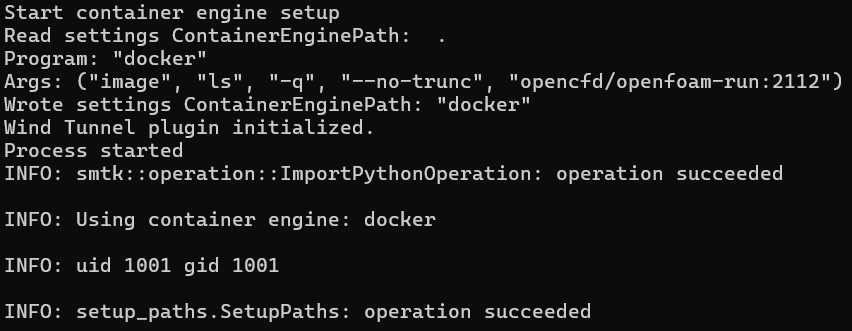
I was finally able to run modelbuilder with my default user on Ubuntu :
And guess what? The WingTunnel example is now working as a charm:

Thanks for your valuable help on this topic John 🙏
After testing other examples, the next step for me is to be able to design my own plugins.
I would eventually like to develop a specific plugin to run the FEniCSx simulation code.
Can you confirm that I need to install modelbuilder from sources to do that?
---
### Author:  [@johnt](https://discourse.kitware.com/u/johnt)
#### Post date: [March 7, 2024, 1:36am UTC](https://discourse.kitware.com/t/struggle-to-get-the-windtunnel-modelbuilder-running-properly/1230/20 "2024-03-07T01:36:32Z")
That’s great! I admire your persistence and thank you for reporting back.
1. I have very little experience with WSL, but I would have thought your first approach – installing docker-ce directly would, at least should, have worked for you.
2. Good that you figured out you needed to add your user to the docker group. I had forgotten about that.
3. In terms of implementing your own plugins, yes, you will need to build modelbuilder from source code. .
- The starting point is the cmb-superbuild. The web page is [https://gitlab.kitware.com/cmb/cmb-superbuild](https://gitlab.kitware.com/cmb/cmb-superbuild), which is used to build all of the dependent libraries. I am pretty sure you can pull the source without an account on our gitlab server.
- Check the README.md for general requirements: cmake, ninja, gcc are the big ones. Ubuntu has a build-essential package that should have most or all of what you need.
- Don’t install Qt from the ubuntu packages, but instead get the installer from Qt’s community page: [Open Source Development | Open Source License | Qt](https://www.qt.io/download-open-source). Go to that page and scroll down to find a green button labeled “Download the Qt Online Installer”. When you run that, you **will** need to create a (free) account with Qt before it will let you install.
- When you get to the part where you can select what to install, open the “Qt” item, open its child item “Qt 5.15.2” and select “Desktop gcc 64-bit”. And unselected everything else, otherwise you will download a huge amount of other stuff you won’t need.
- I might be getting ahead of things, but when you are ready to run cmake, be sure to set both `DEVELOPER_MODE_cmb` and `DEVELOPER_MODE_smtk` to `ON`. You’ll also need to set `Qt5_DIR` to point to your installed Qt.
That’s alot and we’re not done yet. Ping me back if you get stuck or when you are ready to build cmb-superbuild.
[Next page](https://discourse.kitware.com/t/struggle-to-get-the-windtunnel-modelbuilder-running-properly/1230.md?page=2)