# Using Pulse Unity Asset for UWP Apps with IL2CPP
**URL:** https://discourse.kitware.com/t/using-pulse-unity-asset-for-uwp-apps-with-il2cpp/292
**Category:** Pulse Physiology Engine
**Created:** [July 23, 2019, 6:09pm UTC](https://discourse.kitware.com/t/using-pulse-unity-asset-for-uwp-apps-with-il2cpp/292 "2019-07-23T18:09:53Z")
**Posts on this page:** 20
**Page:** 1
### Author:  [@sahilm](https://discourse.kitware.com/u/sahilm)
#### Post date: [July 23, 2019, 6:09pm UTC](https://discourse.kitware.com/t/using-pulse-unity-asset-for-uwp-apps-with-il2cpp/292/1 "2019-07-23T18:09:53Z")
Hello,
I would like to use the Pulse Physiology Engine as part of a HoloLens project I am developing using Unity. I saw on the documentation that using IL2CPP is not currently supported, however, IL2CPP is the only scripting backend available for the UWP platform. I have tried using the steps here ([https://gitlab.kitware.com/physiology/PulseUnityAsset#il2cpp-build-support](https://gitlab.kitware.com/physiology/PulseUnityAsset#il2cpp-build-support)) and was able to successfully build the project in Unity and get the generated Visual Studio solution. However, when I try to deploy the Visual Studio solution to the HoloLens, I get an error that it is missing PulseC.dll. Looking into this further, I see that the native DLL has only been copied into the x64 plugins folder, but the HoloLens requires x86.
I tried copying over the DLL from the x64 folder to the x86 folder and the app deployed successfully, however it does not work as expected, as the line graphs don’t show and the numerical text don’t change from their default values. I also tried building the DLL from scratch using the steps at this link ([https://gitlab.kitware.com/physiology/engine#building](https://gitlab.kitware.com/physiology/engine#building)) and building with Visual Studio, but I get the following errors:
1.
> Error MSB6006 “cmd.exe” exited with code 1. [C:\physiology\builds\Pulse\PulseJava.vcxproj] Pulse C:\Program Files (x86)\Microsoft Visual Studio\2019\Community\MSBuild\Microsoft\VC\v160\Microsoft.CppCommon.targets 220
1.
> Error Could not find or load main class com.kitware.physiology.pulse.dataset.DataSetReader PulseData C:\physiology\builds\EXEC 1
1.
> Error Could not find or load main class com.kitware.physiology.testing.SETestDriver PulseData C:\physiology\builds\EXEC 1
1.
> Error MSB3073 The command “setlocal
> cd C:\physiology\builds\install\bin
> if %errorlevel% neq 0 goto :cmEnd
> C:
> if %errorlevel% neq 0 goto :cmEnd
> “C:\Program Files\CMake\bin\cmake.exe” -DTYPE:STRING=genData -P run.cmake
> if %errorlevel% neq 0 goto :cmEnd
> :cmEnd
> endlocal & call :cmErrorLevel %errorlevel% & goto :cmDone
> :cmErrorLevel
> exit /b %1
> :cmDone
> if %errorlevel% neq 0 goto :VCEnd
> setlocal
> cd C:\physiology\builds\install\bin
> if %errorlevel% neq 0 goto :cmEnd
> C:
> if %errorlevel% neq 0 goto :cmEnd
> “C:\Program Files\CMake\bin\cmake.exe” -DTYPE:STRING=genStates -P run.cmake
> if %errorlevel% neq 0 goto :cmEnd
> :cmEnd
> endlocal & call :cmErrorLevel %errorlevel% & goto :cmDone
> :cmErrorLevel
> exit /b %1
> :cmDone
> if %errorlevel% neq 0 goto :VCEnd
> setlocal
> cd C:\physiology\builds\install\bin
> if %errorlevel% neq 0 goto :cmEnd
> C:
> if %errorlevel% neq 0 goto :cmEnd
> “C:\Program Files\CMake\bin\cmake.exe” -DTYPE:STRING=updateBaselines -P run.cmake
> if %errorlevel% neq 0 goto :cmEnd
> :cmEnd
> endlocal & call :cmErrorLevel %errorlevel% & goto :cmDone
> :cmErrorLevel
> exit /b %1
> :cmDone
> if %errorlevel% neq 0 goto :VCEnd
> :VCEnd” exited with code -1. PulseData C:\Program Files (x86)\Microsoft Visual Studio\2019\Community\MSBuild\Microsoft\VC\v160\Microsoft.CppCommon.targets 138
I have tried building the DLL in both its default, unchanged configuration (x64) and also by changing the active solution platform to x86 and the platform for each project in the solution to Win32 using the configuration manager, but I get the same errors for both.
Despite these errors, I was able to find the DLL in C:\physiology\builds\install\bin, but am unsure that it finished building successfully due to the errors. Copying the newly built DLL over to the HoloLens VS project in the x86 plugins folder did not solve the problem and resulted in the same behavior as before.
**Is it possible to get a DLL that is compatible with x86 systems? How about for ARM64 (since the HoloLens 2 will use that)?**
---
### Author:  [@abray](https://discourse.kitware.com/u/abray)
#### Post date: [July 23, 2019, 6:51pm UTC](https://discourse.kitware.com/t/using-pulse-unity-asset-for-uwp-apps-with-il2cpp/292/2 "2019-07-23T18:51:52Z")
Hi sahilm,
Are you building the 2.x branch?
The DLL that you built using a x86 platform target would be a x86 dll, the build failed on not being able to find a 32-bit Java SDK, which is not necessary if you only want the PulseC.dll.
I do have x86 binaries already built for windows you can try [here](https://data.kitware.com/#collection/59849c788d777f7d33e9c084/folder/5c59a1018d777f072b2c79e6)
---
### Author:  [@sahilm](https://discourse.kitware.com/u/sahilm)
#### Post date: [July 23, 2019, 7:22pm UTC](https://discourse.kitware.com/t/using-pulse-unity-asset-for-uwp-apps-with-il2cpp/292/3 "2019-07-23T19:22:06Z")
Hi @abray,
Thanks for your suggestions. I tried building with the master branch, but I suppose I could try building with the 2.x as well. I will let you know how that goes.
I wasn’t able to find the PulseC.dll in the pulse\_2\_0\_0\_win32\_sdk.zip or pulse\_2\_1\_0\_rc1\_win32\_sdk.zip builds. Could you direct me to where I should be looking or what I should do to try it out with my HoloLens VS solution?
---
### Author:  [@abray](https://discourse.kitware.com/u/abray)
#### Post date: [July 23, 2019, 7:24pm UTC](https://discourse.kitware.com/t/using-pulse-unity-asset-for-uwp-apps-with-il2cpp/292/4 "2019-07-23T19:24:21Z")
Well, I guess I did not package up the pulseC.dll in those zips.
Try building 2.x as x86 and see how that goes
---
### Author:  [@sahilm](https://discourse.kitware.com/u/sahilm)
#### Post date: [July 23, 2019, 8:09pm UTC](https://discourse.kitware.com/t/using-pulse-unity-asset-for-uwp-apps-with-il2cpp/292/5 "2019-07-23T20:09:22Z")
Just built the 2.x branch, no errors! Unfortunately, copying over the new DLL still doesn’t fix the original problem.
---
### Author:  [@sahilm](https://discourse.kitware.com/u/sahilm)
#### Post date: [July 23, 2019, 8:59pm UTC](https://discourse.kitware.com/t/using-pulse-unity-asset-for-uwp-apps-with-il2cpp/292/6 "2019-07-23T20:59:17Z")
So I ran a debug build of the app on the HoloLens to see what was going on and got the following error:
> System.DllNotFoundException: Unable to load DLL ‘PulseC’: The specified module could not be found.
Any reason why this might be the case, especially since it was able to build and deploy fine?
---
### Author:  [@abray](https://discourse.kitware.com/u/abray)
#### Post date: [July 24, 2019, 12:23pm UTC](https://discourse.kitware.com/t/using-pulse-unity-asset-for-uwp-apps-with-il2cpp/292/7 "2019-07-24T12:23:48Z")
Did you change the platform settings on the DLL to be x86?
---
### Author:  [@sahilm](https://discourse.kitware.com/u/sahilm)
#### Post date: [July 24, 2019, 1:53pm UTC](https://discourse.kitware.com/t/using-pulse-unity-asset-for-uwp-apps-with-il2cpp/292/8 "2019-07-24T13:53:48Z")
I just changed the Visual Studio configuration settings to the following before building the solution.
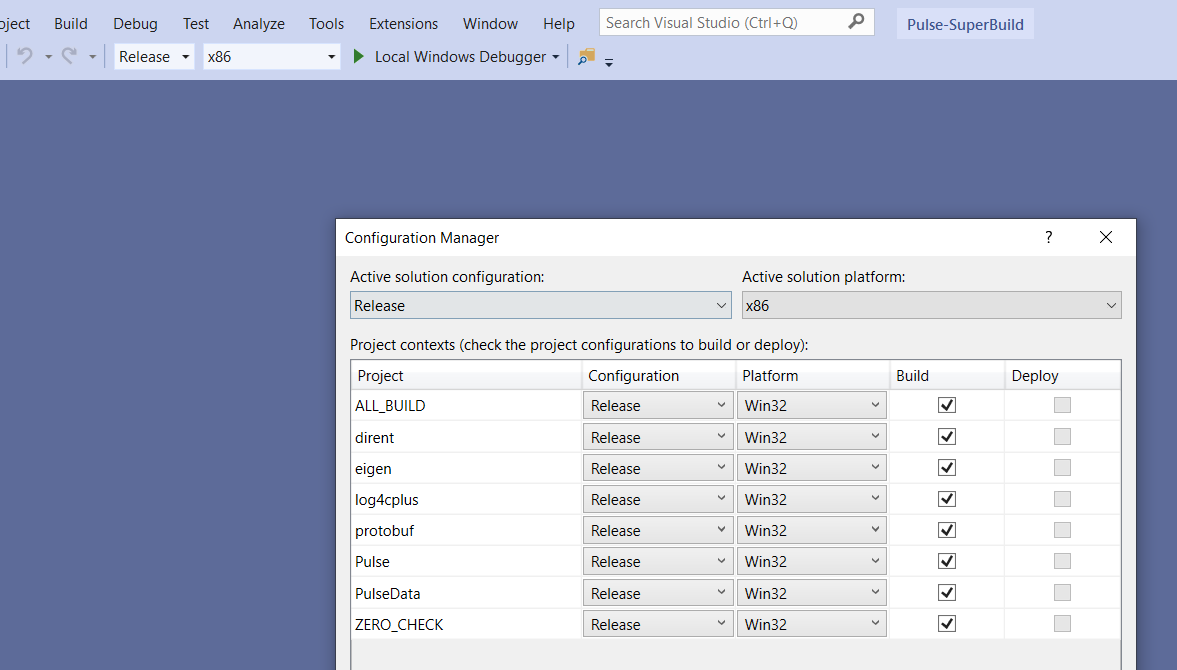
Is there anything I have to specifically do to the DLL?
---
### Author:  [@abray](https://discourse.kitware.com/u/abray)
#### Post date: [July 24, 2019, 1:56pm UTC](https://discourse.kitware.com/t/using-pulse-unity-asset-for-uwp-apps-with-il2cpp/292/9 "2019-07-24T13:56:50Z")
That should build a x86 DLL
But I think you need to tell unity that the PulseC.DLL is for x86
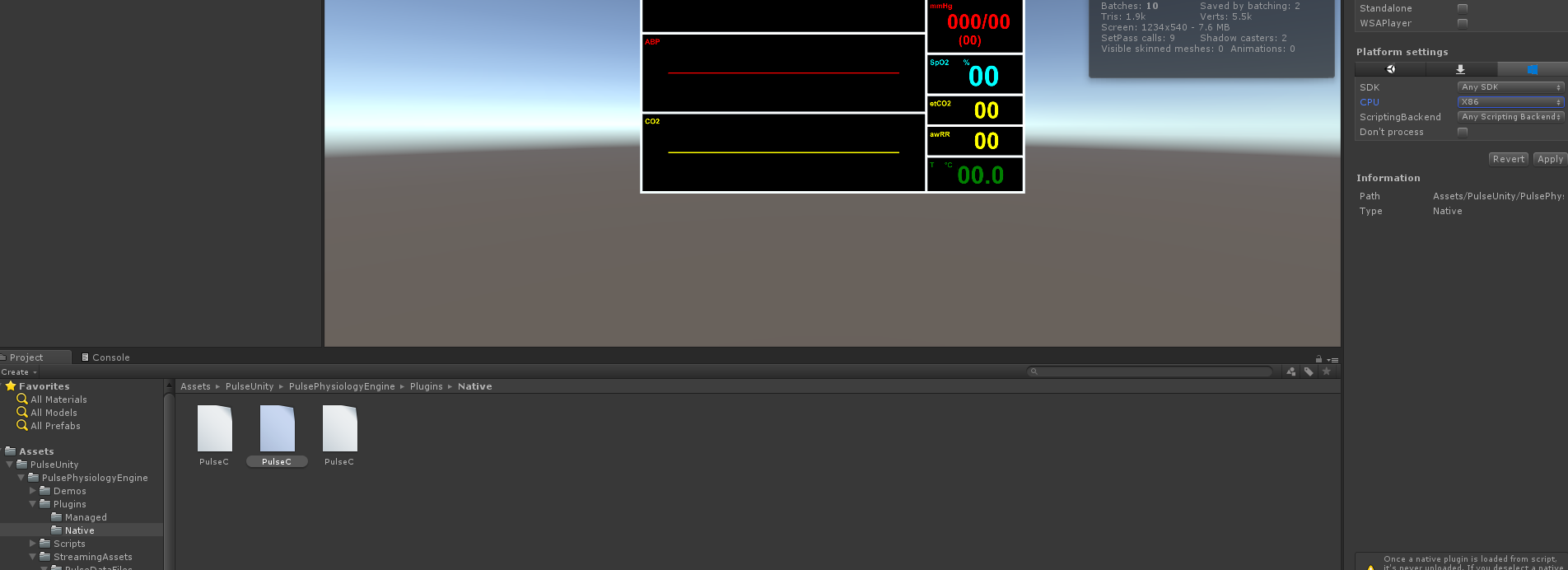
---
### Author:  [@sahilm](https://discourse.kitware.com/u/sahilm)
#### Post date: [July 24, 2019, 2:06pm UTC](https://discourse.kitware.com/t/using-pulse-unity-asset-for-uwp-apps-with-il2cpp/292/10 "2019-07-24T14:06:14Z")
This is what mine looks like. It already showed as x86 in Unity.

Though, looking at this one thing I think I could try is checking the “Load on startup” box. I’ll let you know how that goes.
UPDATE: Still no luck ☹
---
### Author:  [@sahilm](https://discourse.kitware.com/u/sahilm)
#### Post date: [July 24, 2019, 2:49pm UTC](https://discourse.kitware.com/t/using-pulse-unity-asset-for-uwp-apps-with-il2cpp/292/11 "2019-07-24T14:49:06Z")
Found this link that may help explain why the DLL might not be working with the HoloLens.
[https://docs.microsoft.com/en-us/cpp/porting/how-to-use-existing-cpp-code-in-a-universal-windows-platform-app?view=vs-2019#BK\_Win32DLL](https://docs.microsoft.com/en-us/cpp/porting/how-to-use-existing-cpp-code-in-a-universal-windows-platform-app?view=vs-2019#BK_Win32DLL)
Still unsure of what the next steps would be though.
---
### Author:  [@abray](https://discourse.kitware.com/u/abray)
#### Post date: [July 24, 2019, 2:51pm UTC](https://discourse.kitware.com/t/using-pulse-unity-asset-for-uwp-apps-with-il2cpp/292/12 "2019-07-24T14:51:13Z")
What version of unity are you using?
Usually Native DLL need to go under a Native folder for unity to know where they are.
Has that changed?
You might want to try adding the folder containing PulseC.dll to your PATH to see if it can be found.
I have used Pulse in a UWP app with out issue, just not x86… and in a Native Folder
---
### Author:  [@sahilm](https://discourse.kitware.com/u/sahilm)
#### Post date: [July 24, 2019, 3:05pm UTC](https://discourse.kitware.com/t/using-pulse-unity-asset-for-uwp-apps-with-il2cpp/292/13 "2019-07-24T15:05:25Z")
Using Unity 2019.1.11f1.
I put the DLL in Assets\Plugins\WSAPlayer\x86 mainly because of the recommendation on here [https://forums.hololens.com/discussion/2615/hololens-with-artoolkit-and-unity-arwrapper-dll-not-found](https://forums.hololens.com/discussion/2615/hololens-with-artoolkit-and-unity-arwrapper-dll-not-found). I could try it out with the Native folder as well.
I don’t think you have access to the PATH on a HoloLens device.
---
### Author:  [@abray](https://discourse.kitware.com/u/abray)
#### Post date: [July 24, 2019, 3:13pm UTC](https://discourse.kitware.com/t/using-pulse-unity-asset-for-uwp-apps-with-il2cpp/292/14 "2019-07-24T15:13:24Z")
That makes sense
I know PulseC does not depend on anything other than system libraries
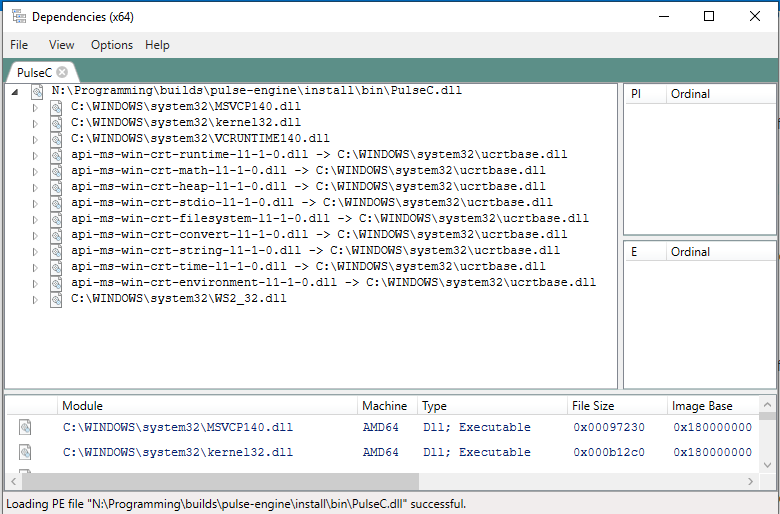
You make sure your project is not using the AnyCPU anywhere?
Seems like that may have issues too
>
---
### Author:  [@sahilm](https://discourse.kitware.com/u/sahilm)
#### Post date: [July 24, 2019, 4:44pm UTC](https://discourse.kitware.com/t/using-pulse-unity-asset-for-uwp-apps-with-il2cpp/292/15 "2019-07-24T16:44:12Z")
I can’t find where it might be using AnyCPU.
One thing I did find is that in the Advanced tab of each project’s properties, the “Preferred Build Tool Architecture” was set to “64-bit (x64)”. I changed this to “32-bit (x86)” for each project and rebuilt the solution. Still no luck.
I then followed the steps at [this link](https://trinitycore.atlassian.net/wiki/spaces/tc/pages/2130022/How+to+tell+if+.dll+is+32+bits+or+64+bits) and found out that the DLL being built was in fact 64-bit, as shown in the picture below.
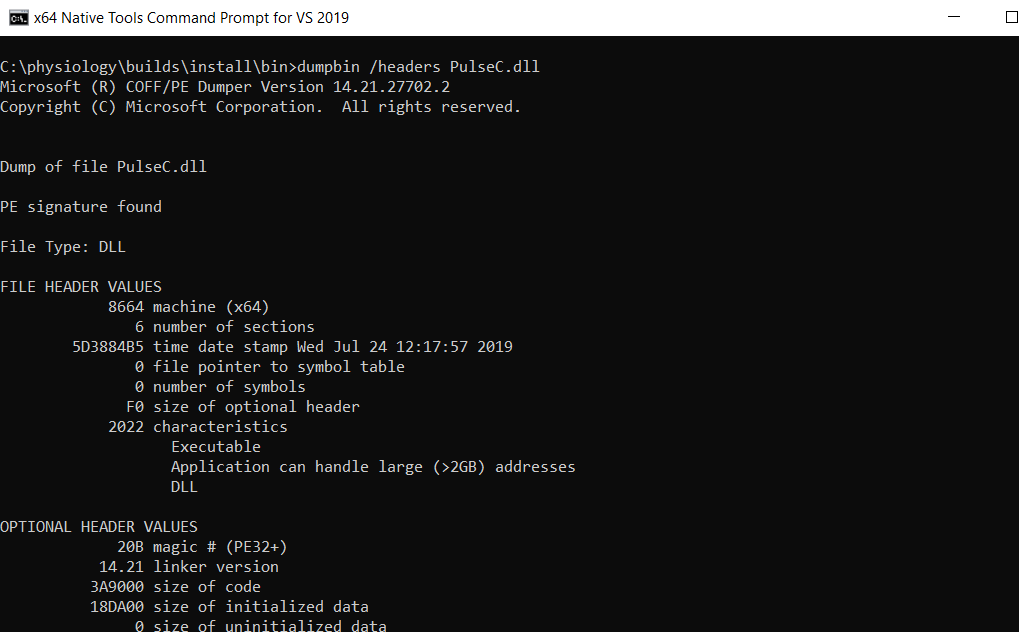
Any idea how to fix this?
---
### Author:  [@abray](https://discourse.kitware.com/u/abray)
#### Post date: [July 24, 2019, 4:45pm UTC](https://discourse.kitware.com/t/using-pulse-unity-asset-for-uwp-apps-with-il2cpp/292/16 "2019-07-24T16:45:54Z")
Let me build you a x86 build
---
### Author:  [@abray](https://discourse.kitware.com/u/abray)
#### Post date: [July 24, 2019, 5:13pm UTC](https://discourse.kitware.com/t/using-pulse-unity-asset-for-uwp-apps-with-il2cpp/292/17 "2019-07-24T17:13:37Z")
I posted a new zip here for 2.2 (which should officially come out later this month)
[https://data.kitware.com/#collection/59849c788d777f7d33e9c084/folder/5c59a1018d777f072b2c79e6](https://data.kitware.com/#collection/59849c788d777f7d33e9c084/folder/5c59a1018d777f072b2c79e6)
Also note, I use this tool to inspect dlls. It can tell your bitness and dependencies
> **[lucasg/Dependencies](https://github.com/lucasg/Dependencies)**
>
> A rewrite of the old legacy software "depends.exe" in C# for Windows devs to troubleshoot dll load dependencies issues. - lucasg/Dependencies
---
### Author:  [@sahilm](https://discourse.kitware.com/u/sahilm)
#### Post date: [July 24, 2019, 6:01pm UTC](https://discourse.kitware.com/t/using-pulse-unity-asset-for-uwp-apps-with-il2cpp/292/18 "2019-07-24T18:01:10Z")
Thanks so much for building and sending that over! Unfortunately, I’m still get the same error.
---
### Author:  [@abray](https://discourse.kitware.com/u/abray)
#### Post date: [July 24, 2019, 6:11pm UTC](https://discourse.kitware.com/t/using-pulse-unity-asset-for-uwp-apps-with-il2cpp/292/19 "2019-07-24T18:11:18Z")
Well, that is disappointing…
I honestly don’t know, I have not worked with the hololens
Have you tried just running the default Pulse Unity Asset on your machine, and maybe with this x86 package?
I wonder if it is just some weirdness associated with the hololens and not unity in general…
---
### Author:  [@sahilm](https://discourse.kitware.com/u/sahilm)
#### Post date: [July 24, 2019, 9:27pm UTC](https://discourse.kitware.com/t/using-pulse-unity-asset-for-uwp-apps-with-il2cpp/292/20 "2019-07-24T21:27:33Z")
I tried creating a new project with just the Pulse Unity Asset. Switched the platform to UWP and built the VitalsMonitor example scene. I then tried deploying the UWP app directly to my PC. I still get the same error when I build for x86, however, everything seems to be working fine when I build for x64.
I then tried completely deleting all the PulseC files in the Native folder that come as part of the asset package and then adding the 32-bit DLL that you sent into the same folder so that it is the only PulseC.dll in the project. When I did this, I got the following errors in the Unity editor.

[Next page](https://discourse.kitware.com/t/using-pulse-unity-asset-for-uwp-apps-with-il2cpp/292.md?page=2)